# [POST] Add Record
Source: https://docs.vecurity.net/api-reference/endpoint/vecurity-vise/add-record
The purpose of this endpoint is to create a new record on the Vecurity DNS.
**Prerequisite:**
Please ensure you have read the VISE Overview before proceeding as the API endpoint is based on your VISE url which is dynamic.
Where vise-url is mentioned, we are referring to your actual VISE domain, not 'vise-url'. Explained in the VISE overview.
All requests to the Vecurity VISE API requires Session creation in tandem with your Vecurity API token in order to make use of the API Endpoints. More details can be found the [VISE Authentication](/api-reference/endpoint/vecurity-vise/vise-authentication) page.
If you require support here, please get in touch with our Live chat or [support@vecurity.net](mailto:support@vecurity.net)
#### HTTP Endpoint `POST`
```
https://{VISE-URL}/v1/create_record
```
#### Headers
```
Authorization: Bearer {your_api_token}
```
#### Query Parameters
```
Authorization: Bearer {your_api_token}
- domain_id - String (required) - A unique GUID identifier for a domain.
- record_type - String (required) - Type of DNS record (e.g., A, CNAME, MX).
- record_name - String (required) - A name for a DNS record.
- record_value - String (required) - The content of a DNS record (e.g., IP address or - canonical domain).
- record_ttl - String (required) - Time in seconds for which a DNS record is valid and cached.
- record_priority - String (not required) - Priority for records like MX (lower values indicate higher priority). Required for MX records.
- record_proxied - Boolean (not required) -A domain being proxied.
```
#### Endpoint Description
The purpose of this endpoint is to create a new record on the Vecurity DNS.
#### Response Example
```json 200
{
"message": "Successfully created record.",
"status_code": 200,
"timestamp": "YYYY-MM-DDTHH:MM:SS UTC"
}
```
# [POST] Create IP Block
Source: https://docs.vecurity.net/api-reference/endpoint/vecurity-vise/create-ip-block
The purpose of this endpoint is to create an IP block on accessing a record.
**Prerequisite:**
Please ensure you have read the VISE Overview before proceeding as the API endpoint is based on your VISE url which is dynamic.
Where vise-url is mentioned, we are referring to your actual VISE domain, not 'vise-url'. Explained in the VISE overview.
All requests to the Vecurity VISE API requires Session creation in tandem with your Vecurity API token in order to make use of the API Endpoints. More details can be found the [VISE Authentication](/api-reference/endpoint/vecurity-vise/vise-authentication) page.
If you require support here, please get in touch with our Live chat or [support@vecurity.net](mailto:support@vecurity.net)
#### HTTP Endpoint `POST`
```
https://{VISE-URL}/api/ip_block
```
#### Headers
```
Authorization: Bearer {your_api_token}
```
#### Query Parameters
```
Authorization: Bearer {your_api_token}
- domain_id - String (required) - A unique GUID identifier for a domain.
- record_id - String (required) - A unique GUID identifier for a record.
- remote_addr - String (required) - An IP address/subnet.
```
#### Endpoint Description
The purpose of this endpoint is to create an IP block on accessing a record.
#### Response Example
```json 200
{
"message": "Successfully blocked the ip/subnet.",
"status_code": 200,
"timestamp": "YYYY-MM-DDTHH:MM:SS UTC"
}
```
# [POST] Create Redirect
Source: https://docs.vecurity.net/api-reference/endpoint/vecurity-vise/create-redirect
The purpose of this endpoint is to add a redirect to a record within a domain.
**Prerequisite:**
Please ensure you have read the VISE Overview before proceeding as the API endpoint is based on your VISE url which is dynamic.
Where vise-url is mentioned, we are referring to your actual VISE domain, not 'vise-url'. Explained in the VISE overview.
All requests to the Vecurity VISE API requires Session creation in tandem with your Vecurity API token in order to make use of the API Endpoints. More details can be found the [VISE Authentication](/api-reference/endpoint/vecurity-vise/vise-authentication) page.
If you require support here, please get in touch with our Live chat or [support@vecurity.net](mailto:support@vecurity.net)
#### HTTP Endpoint `POST`
```
https://{VISE-URL}/api/create_redirect
```
#### Headers
```
Authorization: Bearer {your_api_token}
```
#### Query Parameters
```
Authorization: Bearer {your_api_token}
- domain_id - String (required) - A unique GUID identifier for a domain.
- record_id - String (required) - A unique GUID identifier for a record.
- redirect_from - String - (required) - URL path to redirect traffic from.
- redirect_type - String - (required) - The type of redirect. (e.g, 301 or 302).
- redirect_to - String - (required) - Destination URL path for a redirect.
```
#### Endpoint Description
The purpose of this endpoint is to add a redirect to a record within a domain.
#### Response Example
```json 200
{
"message": "Successfully created redirect.",
"status_code": 200,
"timestamp": "YYYY-MM-DDTHH:MM:SS UTC"
}
```
# [POST] Create Region Block
Source: https://docs.vecurity.net/api-reference/endpoint/vecurity-vise/create-region-block
The purpose of this endpoint is to create a block on a region accessing a record.
**Prerequisite:**
Please ensure you have read the VISE Overview before proceeding as the API endpoint is based on your VISE url which is dynamic.
Where vise-url is mentioned, we are referring to your actual VISE domain, not 'vise-url'. Explained in the VISE overview.
All requests to the Vecurity VISE API requires Session creation in tandem with your Vecurity API token in order to make use of the API Endpoints. More details can be found the [VISE Authentication](/api-reference/endpoint/vecurity-vise/vise-authentication) page.
If you require support here, please get in touch with our Live chat or [support@vecurity.net](mailto:support@vecurity.net)
#### HTTP Endpoint `POST`
```
https://{VISE-URL}/api/region_block
```
#### Headers
```
Authorization: Bearer {your_api_token}
```
#### Query Parameters
```
Authorization: Bearer {your_api_token}
- domain_id - String (required) - A unique GUID identifier for a domain.
- record_id - String (required) - A unique GUID identifier for a record.
- country_code- String (required) - A country code that you wish to block.
```
#### Endpoint Description
The purpose of this endpoint is to create a block on a region accessing a record.
#### Response Example
```json 200
{
"message": "Successfully blocked region.",
"status_code": 200,
"timestamp": "YYYY-MM-DDTHH:MM:SS UTC"
}
```
# [POST] Remove IP Block
Source: https://docs.vecurity.net/api-reference/endpoint/vecurity-vise/delete-ip-block
The purpose of this endpoint is to remove a IP block from a record.
**Prerequisite:**
Please ensure you have read the VISE Overview before proceeding as the API endpoint is based on your VISE url which is dynamic.
Where vise-url is mentioned, we are referring to your actual VISE domain, not 'vise-url'. Explained in the VISE overview.
All requests to the Vecurity VISE API requires Session creation in tandem with your Vecurity API token in order to make use of the API Endpoints. More details can be found the [VISE Authentication](/api-reference/endpoint/vecurity-vise/vise-authentication) page.
If you require support here, please get in touch with our Live chat or [support@vecurity.net](mailto:support@vecurity.net)
#### HTTP Endpoint `POST`
```
https://{VISE-URL}/api/delete_ip_block
```
#### Headers
```
Authorization: Bearer {your_api_token}
```
#### Query Parameters
```
Authorization: Bearer {your_api_token}
- domain_id - String (required) - A unique GUID identifier for a domain.
- record_id - String (required) - A unique GUID identifier for a record.
- ip_block_id- String (required) - A unique GUID identifier for an IP block id.
```
#### Endpoint Description
The purpose of this endpoint is to remove a IP block from a record.
#### Response Example
```json 200
{
"message": "Successfully deleted IP block.",
"status_code": 200,
"timestamp": "YYYY-MM-DDTHH:MM:SS UTC"
}
```
# [POST] Delete Record
Source: https://docs.vecurity.net/api-reference/endpoint/vecurity-vise/delete-record
The purpose of this endpoint is to remove a DNS record from a domain.
**Prerequisite:**
Please ensure you have read the VISE Overview before proceeding as the API endpoint is based on your VISE url which is dynamic.
Where vise-url is mentioned, we are referring to your actual VISE domain, not 'vise-url'. Explained in the VISE overview.
All requests to the Vecurity VISE API requires Session creation in tandem with your Vecurity API token in order to make use of the API Endpoints. More details can be found the [VISE Authentication](/api-reference/endpoint/vecurity-vise/vise-authentication) page.
If you require support here, please get in touch with our Live chat or [support@vecurity.net](mailto:support@vecurity.net)
#### HTTP Endpoint `POST`
```
https://{VISE-URL}/api/delete_record
```
#### Headers
```
Authorization: Bearer {your_api_token}
```
#### Query Parameters
```
Authorization: Bearer {your_api_token}
- domain_id - String (required) - A unique GUID identifier for a domain.
- record_id - String (required) - A unique GUID identifier for a domain.
```
#### Endpoint Description
The purpose of this endpoint is to remove a DNS record from a domain.
#### Response Example
```json 200
{
"message": "Successfully deleted record.",
"status_code": 200,
"timestamp": "YYYY-MM-DDTHH:MM:SS UTC"
}
```
# [POST] Delete Redirect
Source: https://docs.vecurity.net/api-reference/endpoint/vecurity-vise/delete-redirect
The purpose of this endpoint is to remove a redirect rule from a record within a domain.
**Prerequisite:**
Please ensure you have read the VISE Overview before proceeding as the API endpoint is based on your VISE url which is dynamic.
Where vise-url is mentioned, we are referring to your actual VISE domain, not 'vise-url'. Explained in the VISE overview.
All requests to the Vecurity VISE API requires Session creation in tandem with your Vecurity API token in order to make use of the API Endpoints. More details can be found the [VISE Authentication](/api-reference/endpoint/vecurity-vise/vise-authentication) page.
If you require support here, please get in touch with our Live chat or [support@vecurity.net](mailto:support@vecurity.net)
#### HTTP Endpoint `POST`
```
https://{VISE-URL}/api/delete_redirect
```
#### Headers
```
Authorization: Bearer {your_api_token}
```
#### Query Parameters
```
Authorization: Bearer {your_api_token}
- domain_id - String (required) - A unique GUID identifier for a domain.
- record_id - String (required) - A unique GUID identifier for a record.
- redirect_id - String - (required) - A unique GUID identifier for a redirect.
```
#### Endpoint Description
The purpose of this endpoint is to remove a redirect rule from a record within a domain.
#### Response Example
```json 200
{
"message": "Successfully deleted redirect.",
"status_code": 200,
"timestamp": "YYYY-MM-DDTHH:MM:SS UTC"
}
```
# [POST] Remove Region Block
Source: https://docs.vecurity.net/api-reference/endpoint/vecurity-vise/delete-region-block
The purpose of this endpoint is to remove a Region block on a record.
**Prerequisite:**
Please ensure you have read the VISE Overview before proceeding as the API endpoint is based on your VISE url which is dynamic.
Where vise-url is mentioned, we are referring to your actual VISE domain, not 'vise-url'. Explained in the VISE overview.
All requests to the Vecurity VISE API requires Session creation in tandem with your Vecurity API token in order to make use of the API Endpoints. More details can be found the [VISE Authentication](/api-reference/endpoint/vecurity-vise/vise-authentication) page.
If you require support here, please get in touch with our Live chat or [support@vecurity.net](mailto:support@vecurity.net)
#### HTTP Endpoint `POST`
```
https://{VISE-URL}/api/delete_region_block
```
#### Headers
```
Authorization: Bearer {your_api_token}
```
#### Query Parameters
```
Authorization: Bearer {your_api_token}
- domain_id - String (required) - A unique GUID identifier for a domain.
- record_id - String (required) - A unique GUID identifier for a record.
- region_block_id - String (required) - A unique GUID identifier for a region block id.
```
#### Endpoint Description
The purpose of this endpoint is to remove a Region block on a record.
#### Response Example
```json 200
{
"message": "Successfully deleted region block rule.",
"status_code": 200,
"timestamp": "YYYY-MM-DDTHH:MM:SS UTC"
}
```
# [GET] Get Traffic Analytics
Source: https://docs.vecurity.net/api-reference/endpoint/vecurity-vise/get-analytics
The purpose of this endpoint is to list the daily aggregated traffic analytics. When record_id is not supplied (filter), all records will be returned.
**Prerequisite:**
Please ensure you have read the VISE Overview before proceeding as the API endpoint is based on your VISE url which is dynamic.
Where vise-url is mentioned, we are referring to your actual VISE domain, not 'vise-url'. Explained in the VISE overview.
All requests to the Vecurity VISE API requires Session creation in tandem with your Vecurity API token in order to make use of the API Endpoints. More details can be found the [VISE Authentication](/api-reference/endpoint/vecurity-vise/vise-authentication) page.
If you require support here, please get in touch with our Live chat or [support@vecurity.net](mailto:support@vecurity.net)
#### HTTP Endpoint `GET`
```
https://{VISE-URL}/api/traffic_analytics
```
#### Headers
```
Authorization: Bearer {your_api_token}
```
#### Query Parameters
```
Authorization: Bearer {your_api_token}
- domain_id - String (required) - A unique GUID identifier for a domain.
- record_id - String (required) - A unique GUID identifier for a record.
```
#### Endpoint Description
The purpose of this endpoint is to list the daily aggregated traffic analytics. When record\_id is not supplied (filter), all records will be returned.
#### Response Example
```json 200
{
"data": [
{
"data_served": 1234567,
"http_host": "dns1.domain.com",
"record_id": "xxxxxxxxxxxxxxxxxxxxxxxxxx",
"request_date": "YYYY-MM-DDTHH:MM:SS UTC",
"total_requests": 123,
"unique_http_referer": 45,
"unique_status_code": 2,
"unique_user_agents": 1,
"unique_vistors": 22
},
{
"data_served": 1234567,
"http_host": "dns2.domain.com",
"record_id": "xxxxxxxxxxxxxxxxxxxxxxxxxx",
"request_date": "YYYY-MM-DDTHH:MM:SS UTC",
"total_requests": 123,
"unique_http_referer": 45,
"unique_status_code": 2,
"unique_user_agents": 1,
"unique_vistors": 22
}
],
"message": "Successfully retrieved data",
"status_code": 200,
"timestamp": "YYYY-MM-DDTHH:MM:SS UTC"
}
```
# [GET] Get Cache Rule
Source: https://docs.vecurity.net/api-reference/endpoint/vecurity-vise/get-cache
The purpose of this endpoint to list the data relating to cache rules for a record.
**Prerequisite:**
Please ensure you have read the VISE Overview before proceeding as the API endpoint is based on your VISE url which is dynamic.
Where vise-url is mentioned, we are referring to your actual VISE domain, not 'vise-url'. Explained in the VISE overview.
All requests to the Vecurity VISE API requires Session creation in tandem with your Vecurity API token in order to make use of the API Endpoints. More details can be found the [VISE Authentication](/api-reference/endpoint/vecurity-vise/vise-authentication) page.
If you require support here, please get in touch with our Live chat or [support@vecurity.net](mailto:support@vecurity.net)
#### HTTP Endpoint `GET`
```
https://{VISE-URL}/api/record_cache
```
#### Headers
```
Authorization: Bearer {your_api_token}
```
#### Query Parameters
```
Authorization: Bearer {your_api_token}
- domain_id - String (required) - A unique GUID identifier for a domain.
- record_id - String (required) - A unique GUID identifier for a record.
```
#### Endpoint Description
The purpose of this endpoint to list the data relating to cache rules for a record.
#### Response Example
```json 200
{
"data": [
{
"record_added": "YYYY-MM-DDTHH:MM:SS UTC",
"record_alias": "subdomain.domain.com",
"record_id": "xxxxxxxxxxxxxxxxxxxxxxxxxx",
"record_cache_mode": 0
}
],
"message": "Successfully retrieved data",
"status_code": 200,
"timestamp": "YYYY-MM-DDTHH:MM:SS UTC"
}
```
# [GET] Get Traffic by Country
Source: https://docs.vecurity.net/api-reference/endpoint/vecurity-vise/get-country-traffic
This API interface is part of the VISE Analytics module. It fetches data relating to Traffic type data broken down by Country.
**Prerequisite:**
Please ensure you have read the VISE Overview before proceeding as the API endpoint is based on your VISE url which is dynamic.
Where vise-url is mentioned, we are referring to your actual VISE domain, not 'vise-url'. Explained in the VISE overview.
All requests to the Vecurity VISE API requires Session creation in tandem with your Vecurity API token in order to make use of the API Endpoints. More details can be found the [VISE Authentication](/api-reference/endpoint/vecurity-vise/vise-authentication) page.
If you require support here, please get in touch with our Live chat or [support@vecurity.net](mailto:support@vecurity.net)
#### HTTP Endpoint `GET`
```
https://{VISE-URL}/api/insight/country_traffic.json
```
#### Headers
```
Authorization: Bearer {your_api_token}
```
#### Query Parameters
```
Authorization: Bearer {your_api_token}
- domain_id - String (required) - A unique GUID identifier for a domain.
- from_date - Date (required) - Start date of reporting period. [YYYY-MM-DD].
- to_date - Date (required) - End date of reporting period. [YYYY-MM-DD].
```
#### Endpoint Description
This API interface is part of the VISE Analytics module. It fetches data relating to Traffic type data broken down by Country.
The data retrieved from this endpoint specifically is a breakdown of web traffic by traffic type between a period split by country.
#### Response Example
```json 200
{
"data": [
{
"name": "Netherlands",
"value": 7673
},
{
"name": "United States of America",
"value": 4500
},
{
"name": "Germany",
"value": 626
},
{
"name": "Canada",
"value": 259
},
{
"name": "United Kingdom",
"value": 217
}
],
"message": "Successfully retrieved data",
"status_code": 200,
"timestamp": "YYYY-MM-DDTHH:MM:SS UTC"
}
```
# [GET] Get Daily Traffic Analytics
Source: https://docs.vecurity.net/api-reference/endpoint/vecurity-vise/get-daily-traffic
This API interface is part of the VISE Analytics module. It fetches data relating to Traffic data.
**Prerequisite:**
Please ensure you have read the VISE Overview before proceeding as the API endpoint is based on your VISE url which is dynamic.
Where vise-url is mentioned, we are referring to your actual VISE domain, not 'vise-url'. Explained in the VISE overview.
All requests to the Vecurity VISE API requires Session creation in tandem with your Vecurity API token in order to make use of the API Endpoints. More details can be found the [VISE Authentication](/api-reference/endpoint/vecurity-vise/vise-authentication) page.
If you require support here, please get in touch with our Live chat or [support@vecurity.net](mailto:support@vecurity.net)
#### HTTP Endpoint `GET`
```
https://{VISE-URL}/api/insight/daily_traffic.json
```
#### Headers
```
Authorization: Bearer {your_api_token}
```
#### Query Parameters
```
Authorization: Bearer {your_api_token}
- domain_id - String (required) - A unique GUID identifier for a domain.
- from_date - Date (required) - Start date of reporting period. [YYYY-MM-DD].
- to_date - Date (required) - End date of reporting period. [YYYY-MM-DD].
```
#### Endpoint Description
This API interface is part of the VISE Analytics module. It fetches data relating to Traffic data.
The data retrieved from this endpoint specifically is a breakdown of web traffic requests by day between a period.
#### Response Example
```json 200
{
"data": {
"keys": [
"YYYY-MM-DD",
],
"values": [
123,
]
},
"message": "Successfully retrieved data",
"status_code": 200,
"timestamp": "YYYY-MM-DDTHH:MM:SS UTC"
}
```
# [GET] Get Daily WAF Traffic Analytics
Source: https://docs.vecurity.net/api-reference/endpoint/vecurity-vise/get-daily-waf-traffic
This API interface is part of the VISE Analytics module. It fetches data relating to WAF Traffic data.
**Prerequisite:**
Please ensure you have read the VISE Overview before proceeding as the API endpoint is based on your VISE url which is dynamic.
Where vise-url is mentioned, we are referring to your actual VISE domain, not 'vise-url'. Explained in the VISE overview.
All requests to the Vecurity VISE API requires Session creation in tandem with your Vecurity API token in order to make use of the API Endpoints. More details can be found the [VISE Authentication](/api-reference/endpoint/vecurity-vise/vise-authentication) page.
If you require support here, please get in touch with our Live chat or [support@vecurity.net](mailto:support@vecurity.net)
#### HTTP Endpoint `GET`
```
https://{VISE-URL}/api/insight/daily_waf_traffic.json
```
#### Headers
```
Authorization: Bearer {your_api_token}
```
#### Query Parameters
```
Authorization: Bearer {your_api_token}
- domain_id - String (required) - A unique GUID identifier for a domain.
- from_date - Date (required) - Start date of reporting period. [YYYY-MM-DD].
- to_date - Date (required) - End date of reporting period. [YYYY-MM-DD].
```
#### Endpoint Description
This API interface is part of the VISE Analytics module. It fetches data relating to Traffic data.
The data retrieved from this endpoint specifically is a breakdown of web traffic by WAF hit requests by day between a period.
#### Response Example
```json 200
{
"data": {
"keys": [
"YYYY-MM-DD",
],
"values": [
123,
]
},
"message": "Successfully retrieved data",
"status_code": 200,
"timestamp": "YYYY-MM-DDTHH:MM:SS UTC"
}
```
# [GET] Get Domain
Source: https://docs.vecurity.net/api-reference/endpoint/vecurity-vise/get-domain
This endpoint allows you to retrieve a data about a specific domain on your account.
**Prerequisite:**
Please ensure you have read the VISE Overview before proceeding as the API endpoint is based on your VISE url which is dynamic.
Where vise-url is mentioned, we are referring to your actual VISE domain, not 'vise-url'. Explained in the VISE overview.
All requests to the Vecurity VISE API requires Session creation in tandem with your Vecurity API token in order to make use of the API Endpoints. More details can be found the [VISE Authentication](/api-reference/endpoint/vecurity-vise/vise-authentication) page.
If you require support here, please get in touch with our Live chat or [support@vecurity.net](mailto:support@vecurity.net)
#### HTTP Endpoint `GET`
```
https://{VISE-URL}/api/domain
```
#### Headers
```
Authorization: Bearer {your_api_token}
```
#### Query Parameters
```
Authorization: Bearer {your_api_token}
- domain_id - String (required) - A unique GUID identifier for a domain.
```
#### Endpoint Description
This endpoint gets data about a selected domain based on its domain\_id.
#### Response Example
```json 200
{
"status_code": 200,
"message": "Successfully retrieved data",
"timestamp": "YYYY-MM-DDTHH:MM:SS UTC",
"data": [
{
"domain_id": "xxxxxxxxxxxxxxxxxxxxxxxxxx",
"domain_name": "domain.com",
"domain_date_added": "YYYY-MM-DDTHH:MM:SS UTC",
"domain_expiry": "YYYY-MM-DDTHH:MM:SS UTC",
"domain_owner": "John Doe"
}
]
}
```
# [GET] Get Domain Modes
Source: https://docs.vecurity.net/api-reference/endpoint/vecurity-vise/get-domain-modes
The purpose of this endpoint is to retrieve the various modes available for bulk management of your records.
**Prerequisite:**
Please ensure you have read the VISE Overview before proceeding as the API endpoint is based on your VISE url which is dynamic.
Where vise-url is mentioned, we are referring to your actual VISE domain, not 'vise-url'. Explained in the VISE overview.
All requests to the Vecurity VISE API requires Session creation in tandem with your Vecurity API token in order to make use of the API Endpoints. More details can be found the [VISE Authentication](/api-reference/endpoint/vecurity-vise/vise-authentication) page.
If you require support here, please get in touch with our Live chat or [support@vecurity.net](mailto:support@vecurity.net)
#### HTTP Endpoint `GET`
```
https://{VISE-URL}/api/domain_modes
```
#### Headers
```
Authorization: Bearer {your_api_token}
```
#### Query Parameters
```
Authorization: Bearer {your_api_token}
```
#### Endpoint Description
This endpoint refers to all modes available that you can set all records on your domain to be assigned to in bulk.
#### Response Example
```json 200
{
"data": [
{
"domain_mode_id": "xxxx-xxxx-xxxx",
"domain_mode_name": "Use records"
},
{
"domain_mode_id": "xxxx-xxxx-xxxx",
"domain_mode_name": "Use records (+ permanent mitigation)"
},
{
"domain_mode_id": "xxxx-xxxx-xxxx",
"domain_mode_name": "Park domain"
},
{
"domain_mode_id": "xxxx-xxxx-xxxx",
"domain_mode_name": "Disable site"
}
],
"message": "Successfully retrieved data",
"status_code": 200,
"timestamp": "YYYY-MM-DDTHH:MM:SS UTC"
}
```
# [GET] Get Domains
Source: https://docs.vecurity.net/api-reference/endpoint/vecurity-vise/get-domains
This endpoint allows you to retrieve a list of all domains including details.
**Prerequisite:**
Please ensure you have read the VISE Overview before proceeding as the API endpoint is based on your VISE url which is dynamic.
Where vise-url is mentioned, we are referring to your actual VISE domain, not 'vise-url'. Explained in the VISE overview.
All requests to the Vecurity VISE API requires Session creation in tandem with your Vecurity API token in order to make use of the API Endpoints. More details can be found the [VISE Authentication](/api-reference/endpoint/vecurity-vise/vise-authentication) page.
If you require support here, please get in touch with our Live chat or [support@vecurity.net](mailto:support@vecurity.net)
#### HTTP Endpoint `GET`
```
https://{VISE-URL}/api/domains
```
#### Headers
```
Authorization: Bearer {your_api_token}
```
#### Endpoint Description
This endpoint is the essentially equivalent to the [Vecurity Domains](/api-reference/endpoint/vecurity/get-domains) endpoint but accessible on the Vecurity VISE API interface instead.
It lists all domains on your account (this is linked to auth\_token query parameter).
#### Response Example
```json 200
{
"status_code": 200,
"message": "Successfully retrieved data",
"timestamp": "YYYY-MM-DDTHH:MM:SS UTC",
"data": [
{
"domain_id": "xxxxxxxxxxxxxxxxxxxxxxxxxx",
"domain_name": "domain.com",
"domain_date_added": "YYYY-MM-DDTHH:MM:SS UTC",
"domain_expiry": "YYYY-MM-DDTHH:MM:SS UTC",
"domain_owner": "John Doe"
}
]
}
```
# [GET] Get Granular Traffic Data
Source: https://docs.vecurity.net/api-reference/endpoint/vecurity-vise/get-granular-traffic
This API interface is part of the VISE Analytics module. It fetches data relating to Traffic type data in granular form.
**Prerequisite:**
Please ensure you have read the VISE Overview before proceeding as the API endpoint is based on your VISE url which is dynamic.
Where vise-url is mentioned, we are referring to your actual VISE domain, not 'vise-url'. Explained in the VISE overview.
All requests to the Vecurity VISE API requires Session creation in tandem with your Vecurity API token in order to make use of the API Endpoints. More details can be found the [VISE Authentication](/api-reference/endpoint/vecurity-vise/vise-authentication) page.
If you require support here, please get in touch with our Live chat or [support@vecurity.net](mailto:support@vecurity.net)
#### HTTP Endpoint `GET`
```
https://{VISE-URL}/api/insight/all_traffic.json
```
#### Headers
```
Authorization: Bearer {your_api_token}
```
#### Query Parameters
```
Authorization: Bearer {your_api_token}
- domain_id - String (required) - A unique GUID identifier for a domain.
- from_date - Date (required) - Start date of reporting period. [YYYY-MM-DD].
- to_date - Date (required) - End date of reporting period. [YYYY-MM-DD].
```
#### Endpoint Description
This API interface is part of the VISE Analytics module. It fetches data relating to Traffic type data in granular form.
Data is aggregated by the second of a timestamp, therefore there can be several requests at a given time to an endpoint, hence the usage of a counter.
#### Response Example
```json 200
{
"data": [
{
"counter": 2,
"country": "xxxxxxxxx",
"ip": "xxxxxxxxx",
"isp_name": "xxxxxxxxx",
"status_code": "200 (Success)",
"timestamp": "YYYY-MM-DD HH:II:SS",
"url": "url.com/robots.txt"
},
{
"counter": 1,
"country": "xxxxxxxxx",
"ip": "xxxxxxxxxxx",
"isp_name": "xxxxxxxxxxx",
"status_code": "418 (DDOS Mitigation)",
"timestamp": "YYYY-MM-DD HH:II:SS",
"url": "url.com"
},
],
"message": "Successfully retrieved data",
"status_code": 200,
"timestamp": "YYYY-MM-DDTHH:MM:SS UTC"
}
```
# [GET] Get IP Intelligence Data
Source: https://docs.vecurity.net/api-reference/endpoint/vecurity-vise/get-intelligence-for-ip
This API endpoint gathers intelligence data on an IP address that is held by the Vecurity SOC team and other external data feeds..
**Prerequisite:**
Please ensure you have read the VISE Overview before proceeding as the API endpoint is based on your VISE url which is dynamic.
Where vise-url is mentioned, we are referring to your actual VISE domain, not 'vise-url'. Explained in the VISE overview.
All requests to the Vecurity VISE API requires Session creation in tandem with your Vecurity API token in order to make use of the API Endpoints. More details can be found the [VISE Authentication](/api-reference/endpoint/vecurity-vise/vise-authentication) page.
If you require support here, please get in touch with our Live chat or [support@vecurity.net](mailto:support@vecurity.net)
#### HTTP Endpoint `GET`
```
https://{VISE-URL}/api/insight/ip_intelligence.json
```
#### Headers
```
Authorization: Bearer {your_api_token}
```
#### Query Parameters
```
Authorization: Bearer {your_api_token}
- domain_id - String (required) - A unique GUID identifier for a domain.
- remote_addr - String (required) - An IP Address or subnet
```
#### Endpoint Description
This API endpoint gathers intelligence data on an IP address that is held by the Vecurity SOC team and other external data feeds.
Data is withheld for security purposes.
#### Response Example
```json 200
{
"data": [
{}
],
"message": "Successfully retrieved data",
"status_code": 200,
"timestamp": "YYYY-MM-DDTHH:MM:SS UTC"
}
```
# [GET] Get Request Level Intelligence Data
Source: https://docs.vecurity.net/api-reference/endpoint/vecurity-vise/get-intelligence-for-request
This API endpoint gathers intelligence data on a row level request ID that is held by the Vecurity SOC team and other external data feeds.
**Prerequisite:**
Please ensure you have read the VISE Overview before proceeding as the API endpoint is based on your VISE url which is dynamic.
Where vise-url is mentioned, we are referring to your actual VISE domain, not 'vise-url'. Explained in the VISE overview.
All requests to the Vecurity VISE API requires Session creation in tandem with your Vecurity API token in order to make use of the API Endpoints. More details can be found the [VISE Authentication](/api-reference/endpoint/vecurity-vise/vise-authentication) page.
If you require support here, please get in touch with our Live chat or [support@vecurity.net](mailto:support@vecurity.net)
#### HTTP Endpoint `GET`
```
https://{VISE-URL}/api/insight/request_intelligence.json
```
#### Headers
```
Authorization: Bearer {your_api_token}
```
#### Query Parameters
```
Authorization: Bearer {your_api_token}
- domain_id - String (required) - A unique GUID identifier for a domain.
- request_id - String - A unique GUID identifier for a request.
```
#### Endpoint Description
This API endpoint gathers intelligence data on a row level request ID that is held by the Vecurity SOC team and other external data feeds.
Data is withheld for security purposes.
#### Response Example
```json 200
{
"data": [
{}
],
"message": "Successfully retrieved data",
"status_code": 200,
"timestamp": "YYYY-MM-DDTHH:MM:SS UTC"
}
```
# [GET] Get IP Blocks
Source: https://docs.vecurity.net/api-reference/endpoint/vecurity-vise/get-ip-blocks
The purpose of this endpoint is to provide a list of IP blocks associated with a record.
**Prerequisite:**
Please ensure you have read the VISE Overview before proceeding as the API endpoint is based on your VISE url which is dynamic.
Where vise-url is mentioned, we are referring to your actual VISE domain, not 'vise-url'. Explained in the VISE overview.
All requests to the Vecurity VISE API requires Session creation in tandem with your Vecurity API token in order to make use of the API Endpoints. More details can be found the [VISE Authentication](/api-reference/endpoint/vecurity-vise/vise-authentication) page.
If you require support here, please get in touch with our Live chat or [support@vecurity.net](mailto:support@vecurity.net)
#### HTTP Endpoint `GET`
```
https://{VISE-URL}/api/ip_block
```
#### Headers
```
Authorization: Bearer {your_api_token}
```
#### Query Parameters
```
Authorization: Bearer {your_api_token}
- domain_id - String (required) - A unique GUID identifier for a domain.
- record_id - String (required) - A unique GUID identifier for a record.
```
#### Endpoint Description
The purpose of this endpoint is to provide a list of IP blocks associated with a record.
#### Response Example
```json 200
{
"data": [
{
"ip_block_id": "xxxxxxxxxxxxxxxxxxxxxxxxxx",
"remote_addr": "ip"
}
],
"message": "Successfully retrieved data",
"status_code": 200,
"timestamp": "YYYY-MM-DDTHH:MM:SS UTC"
}
```
# [GET] Get Traffic by IP
Source: https://docs.vecurity.net/api-reference/endpoint/vecurity-vise/get-ip-traffic
This API interface is part of the VISE Analytics module. It fetches data relating to Traffic type data broken down by IP.
**Prerequisite:**
Please ensure you have read the VISE Overview before proceeding as the API endpoint is based on your VISE url which is dynamic.
Where vise-url is mentioned, we are referring to your actual VISE domain, not 'vise-url'. Explained in the VISE overview.
All requests to the Vecurity VISE API requires Session creation in tandem with your Vecurity API token in order to make use of the API Endpoints. More details can be found the [VISE Authentication](/api-reference/endpoint/vecurity-vise/vise-authentication) page.
If you require support here, please get in touch with our Live chat or [support@vecurity.net](mailto:support@vecurity.net)
#### HTTP Endpoint `GET`
```
https://{VISE-URL}/api/insight/source_traffic.json
```
#### Headers
```
Authorization: Bearer {your_api_token}
```
#### Query Parameters
```
Authorization: Bearer {your_api_token}
- domain_id - String (required) - A unique GUID identifier for a domain.
- from_date - Date (required) - Start date of reporting period. [YYYY-MM-DD].
- to_date - Date (required) - End date of reporting period. [YYYY-MM-DD].
```
#### Endpoint Description
This API interface is part of the VISE Analytics module. It fetches data relating to Traffic type data broken down by IP.
#### Response Example
```json 200
{
"data": [
{
"name": "ip1",
"value": 2
},
{
"name": "ip2",
"value": 2
}
],
"message": "Successfully retrieved data",
"status_code": 200,
"timestamp": "YYYY-MM-DDTHH:MM:SS UTC"
}
```
# [GET] Get Mitigation Data
Source: https://docs.vecurity.net/api-reference/endpoint/vecurity-vise/get-mitigation-data
The purpose of this endpoint to list the data about thresholds and mitigation for a record within a domain.
**Prerequisite:**
Please ensure you have read the VISE Overview before proceeding as the API endpoint is based on your VISE url which is dynamic.
Where vise-url is mentioned, we are referring to your actual VISE domain, not 'vise-url'. Explained in the VISE overview.
All requests to the Vecurity VISE API requires Session creation in tandem with your Vecurity API token in order to make use of the API Endpoints. More details can be found the [VISE Authentication](/api-reference/endpoint/vecurity-vise/vise-authentication) page.
If you require support here, please get in touch with our Live chat or [support@vecurity.net](mailto:support@vecurity.net)
#### HTTP Endpoint `GET`
```
https://{VISE-URL}/api/record_mitigation
```
#### Headers
```
Authorization: Bearer {your_api_token}
```
#### Query Parameters
```
Authorization: Bearer {your_api_token}
- domain_id - String (required) - A unique GUID identifier for a domain.
- record_id - String (required) - A unique GUID identifier for a record.
```
#### Endpoint Description
The purpose of this endpoint to list the data about thresholds and mitigation for a record within a domain.
#### Response Example
```json 200
{
"data": [
{
"record_added": "YYYY-MM-DDTHH:MM:SS UTC",
"record_alias": "subdomain.domain.com",
"record_id": "xxxxxxxxxxxxxxxxxxxxxxxxxx",
"record_mitigation_mode": 0,
"record_server_threshold": 70,
"record_asset_threshold": 155
}
],
"message": "Successfully retrieved data",
"status_code": 200,
"timestamp": "YYYY-MM-DDTHH:MM:SS UTC"
}
```
# [GET] Get User Profile
Source: https://docs.vecurity.net/api-reference/endpoint/vecurity-vise/get-profile
Get user profile
**Prerequisite:**
Please ensure you have read the VISE Overview before proceeding as the API endpoint is based on your VISE url which is dynamic.
Where vise-url is mentioned, we are referring to your actual VISE domain, not 'vise-url'. Explained in the VISE overview.
All requests to the Vecurity VISE API requires Session creation in tandem with your Vecurity API token in order to make use of the API Endpoints. More details can be found the [VISE Authentication](/api-reference/endpoint/vecurity-vise/vise-authentication) page.
If you require support here, please get in touch with our Live chat or [support@vecurity.net](mailto:support@vecurity.net)
#### HTTP Endpoint `GET`
```
https://{VISE-URL}/api/profile
```
#### Headers
```
Authorization: Bearer {your_api_token}
```
#### Endpoint Description
Retrieves the user profile information for the authenticated user.
#### Response Example
```json 200
{
"status": 200,
"message": "Successfully retrieved user profile",
"data": {}
}
```
```json 400
{
"status": 400,
"message": "Invalid request parameters"
}
```
```json 401
{
"status": 401,
"message": "Authentication required"
}
```
# [GET] Get Realtime Traffic
Source: https://docs.vecurity.net/api-reference/endpoint/vecurity-vise/get-realtime-traffic
Get Traffic [REALTIME]
**Prerequisite:**
Please ensure you have read the VISE Overview before proceeding as the API endpoint is based on your VISE url which is dynamic.
Where vise-url is mentioned, we are referring to your actual VISE domain, not 'vise-url'. Explained in the VISE overview.
All requests to the Vecurity VISE API requires Session creation in tandem with your Vecurity API token in order to make use of the API Endpoints. More details can be found the [VISE Authentication](/api-reference/endpoint/vecurity-vise/vise-authentication) page.
If you require support here, please get in touch with our Live chat or [support@vecurity.net](mailto:support@vecurity.net)
#### HTTP Endpoint `GET`
```
https://{VISE-URL}/api/realtime
```
#### Headers
```
Authorization: Bearer {your_api_token}
```
#### Query Parameters
```
- domain_id - String (required) - Customer provides domain id in MD5 UUID Form
- record_id - String (required) - Customer provides record id
```
#### Endpoint Description
Retrieves real-time traffic data for a specific domain and record.
#### Response Example
```json 200
{
"status": 200,
"message": "Successfully retrieved realtime traffic data",
"data": {}
}
```
```json 400
{
"status": 400,
"message": "Invalid request parameters"
}
```
```json 401
{
"status": 401,
"message": "Authentication required"
}
```
# [GET] Get Record
Source: https://docs.vecurity.net/api-reference/endpoint/vecurity-vise/get-record
The purpose of this endpoint to list the data about a specific record within a domain.
**Prerequisite:**
Please ensure you have read the VISE Overview before proceeding as the API endpoint is based on your VISE url which is dynamic.
Where vise-url is mentioned, we are referring to your actual VISE domain, not 'vise-url'. Explained in the VISE overview.
All requests to the Vecurity VISE API requires Session creation in tandem with your Vecurity API token in order to make use of the API Endpoints. More details can be found the [VISE Authentication](/api-reference/endpoint/vecurity-vise/vise-authentication) page.
If you require support here, please get in touch with our Live chat or [support@vecurity.net](mailto:support@vecurity.net)
#### HTTP Endpoint `GET`
```
https://{VISE-URL}/api/record
```
#### Headers
```
Authorization: Bearer {your_api_token}
```
#### Query Parameters
```
Authorization: Bearer {your_api_token}
- domain_id - String (required) - A unique GUID identifier for a domain.
- record_id - String (required) - A unique GUID identifier for a record.
```
#### Endpoint Description
The purpose of this endpoint to list the data about a specific record within a domain.
#### Response Example
```json 200
{
"data": [
{
"record_added": "YYYY-MM-DDTHH:MM:SS UTC",
"record_alias": "subdomain.domain.com",
"record_id": "xxxxxxxxxxxxxxxxxxxxxxxxxx",
"record_is_proxied": 1,
"record_priority": 000,
"record_target": "12.34.56.78",
"record_ttl": 300,
"record_type": "A"
}
],
"message": "Successfully retrieved data",
"status_code": 200,
"timestamp": "YYYY-MM-DDTHH:MM:SS UTC"
}
```
# [GET] Get Record Cache Details
Source: https://docs.vecurity.net/api-reference/endpoint/vecurity-vise/get-record-cache
Get Record Cache Details
**Prerequisite:**
Please ensure you have read the VISE Overview before proceeding as the API endpoint is based on your VISE url which is dynamic.
Where vise-url is mentioned, we are referring to your actual VISE domain, not 'vise-url'. Explained in the VISE overview.
All requests to the Vecurity VISE API requires Session creation in tandem with your Vecurity API token in order to make use of the API Endpoints. More details can be found the [VISE Authentication](/api-reference/endpoint/vecurity-vise/vise-authentication) page.
If you require support here, please get in touch with our Live chat or [support@vecurity.net](mailto:support@vecurity.net)
#### HTTP Endpoint `GET`
```
https://{VISE-URL}/api/record_cache
```
#### Headers
```
Authorization: Bearer {your_api_token}
```
#### Query Parameters
```
- domain_id - String (required) - Customer provides domain id in MD5 UUID Form
- record_id - String (required) - Customer provides record id
```
#### Endpoint Description
Retrieves cache details for a specific DNS record.
#### Response Example
```json 200
{
"status": 200,
"message": "Successfully retrieved record cache details",
"data": {}
}
```
```json 400
{
"status": 400,
"message": "Invalid request parameters"
}
```
```json 401
{
"status": 401,
"message": "Authentication required"
}
```
# [GET] Get Record Mitigation Details
Source: https://docs.vecurity.net/api-reference/endpoint/vecurity-vise/get-record-mitigation
Get Record Mitigation Details
**Prerequisite:**
Please ensure you have read the VISE Overview before proceeding as the API endpoint is based on your VISE url which is dynamic.
Where vise-url is mentioned, we are referring to your actual VISE domain, not 'vise-url'. Explained in the VISE overview.
All requests to the Vecurity VISE API requires Session creation in tandem with your Vecurity API token in order to make use of the API Endpoints. More details can be found the [VISE Authentication](/api-reference/endpoint/vecurity-vise/vise-authentication) page.
If you require support here, please get in touch with our Live chat or [support@vecurity.net](mailto:support@vecurity.net)
#### HTTP Endpoint `GET`
```
https://{VISE-URL}/api/record_mitigation
```
#### Headers
```
Authorization: Bearer {your_api_token}
```
#### Query Parameters
```
- domain_id - String (required) - Customer provides domain id in MD5 UUID Form
- record_id - String (required) - Customer provides record id
```
#### Endpoint Description
Retrieves mitigation details for a specific DNS record.
#### Response Example
```json 200
{
"status": 200,
"message": "Successfully retrieved record mitigation details",
"data": {}
}
```
```json 400
{
"status": 400,
"message": "Invalid request parameters"
}
```
```json 401
{
"status": 401,
"message": "Authentication required"
}
```
# [GET] Get Traffic by Record
Source: https://docs.vecurity.net/api-reference/endpoint/vecurity-vise/get-record-traffic
This API interface is part of the VISE Analytics module. It fetches data relating to Traffic type data broken down by Record.
**Prerequisite:**
Please ensure you have read the VISE Overview before proceeding as the API endpoint is based on your VISE url which is dynamic.
Where vise-url is mentioned, we are referring to your actual VISE domain, not 'vise-url'. Explained in the VISE overview.
All requests to the Vecurity VISE API requires Session creation in tandem with your Vecurity API token in order to make use of the API Endpoints. More details can be found the [VISE Authentication](/api-reference/endpoint/vecurity-vise/vise-authentication) page.
If you require support here, please get in touch with our Live chat or [support@vecurity.net](mailto:support@vecurity.net)
#### HTTP Endpoint `GET`
```
https://{VISE-URL}/api/insight/host_traffic.json
```
#### Headers
```
Authorization: Bearer {your_api_token}
```
#### Query Parameters
```
Authorization: Bearer {your_api_token}
- domain_id - String (required) - A unique GUID identifier for a domain.
- from_date - Date (required) - Start date of reporting period. [YYYY-MM-DD].
- to_date - Date (required) - End date of reporting period. [YYYY-MM-DD].
```
#### Endpoint Description
This API interface is part of the VISE Analytics module. It fetches data relating to Traffic type data broken down by Record.
The data retrieved from this endpoint specifically is a breakdown of web traffic by traffic type between a period split by record.
#### Response Example
```json 200
{
"data": [
{
"name": "record.domain.com",
"value": 13571
},
{
"name": "record2.domain.com",
"value": 570
}
],
"message": "Successfully retrieved data",
"status_code": 200,
"timestamp": "YYYY-MM-DDTHH:MM:SS UTC"
}
```
# [GET] Get Records
Source: https://docs.vecurity.net/api-reference/endpoint/vecurity-vise/get-records
The purpose of this endpoint is to provide a list of records associated with a given domain ID, along with detailed information for each record.
**Prerequisite:**
Please ensure you have read the VISE Overview before proceeding as the API endpoint is based on your VISE url which is dynamic.
Where vise-url is mentioned, we are referring to your actual VISE domain, not 'vise-url'. Explained in the VISE overview.
All requests to the Vecurity VISE API requires Session creation in tandem with your Vecurity API token in order to make use of the API Endpoints. More details can be found the [VISE Authentication](/api-reference/endpoint/vecurity-vise/vise-authentication) page.
If you require support here, please get in touch with our Live chat or [support@vecurity.net](mailto:support@vecurity.net)
#### HTTP Endpoint `GET`
```
https://{VISE-URL}/api/records
```
#### Headers
```
Authorization: Bearer {your_api_token}
```
#### Query Parameters
```
Authorization: Bearer {your_api_token}
- domain_id - String (required) - A unique GUID identifier for a domain.
```
#### Endpoint Description
The purpose of this endpoint is to provide a list of records associated with a given domain ID, along with detailed information for each record.
#### Response Example
```json 200
{
"data": [
{
"record_added": "YYYY-MM-DDTHH:MM:SS UTC",
"record_alias": "subdomain.domain.com",
"record_id": "xxxxxxxxxxxxxxxxxxxxxxxxxx",
"record_is_proxied": 1,
"record_priority": 000,
"record_target": "12.34.56.78",
"record_ttl": 300,
"record_type": "A"
}
],
"message": "Successfully retrieved data",
"status_code": 200,
"timestamp": "YYYY-MM-DDTHH:MM:SS UTC"
}
```
# [GET] Get Redirect
Source: https://docs.vecurity.net/api-reference/endpoint/vecurity-vise/get-redirect
The purpose of this endpoint is to list all of the redirect rules for a specific record within a domain.
**Prerequisite:**
Please ensure you have read the VISE Overview before proceeding as the API endpoint is based on your VISE url which is dynamic.
Where vise-url is mentioned, we are referring to your actual VISE domain, not 'vise-url'. Explained in the VISE overview.
All requests to the Vecurity VISE API requires Session creation in tandem with your Vecurity API token in order to make use of the API Endpoints. More details can be found the [VISE Authentication](/api-reference/endpoint/vecurity-vise/vise-authentication) page.
If you require support here, please get in touch with our Live chat or [support@vecurity.net](mailto:support@vecurity.net)
#### HTTP Endpoint `GET`
```
https://{VISE-URL}/api/redirect
```
#### Headers
```
Authorization: Bearer {your_api_token}
```
#### Query Parameters
```
Authorization: Bearer {your_api_token}
- domain_id - String (required) - A unique GUID identifier for a domain.
- record_id - String (required) - A unique GUID identifier for a record.
- redirect_id - Sstring (required) - A unique GUID identifier for a redirect.
```
#### Endpoint Description
The purpose of this endpoint is to list all of the redirect rules for a specific record within a domain.
#### Response Example
```json 200
{
"data": [
{
"redirect_from": "/page1",
"redirect_id": "xxxxxxxxxxxxxxxxxxxxxxxxxx",
"redirect_to": "https://destination1.com",
"redirect_type": 301
}
],
"message": "Successfully retrieved data",
"status_code": 200,
"timestamp": "YYYY-MM-DDTHH:MM:SS UTC"
}
```
# [GET] Get Redirects
Source: https://docs.vecurity.net/api-reference/endpoint/vecurity-vise/get-redirects
The purpose of this endpoint is to list all of the redirect rules for a record.
**Prerequisite:**
Please ensure you have read the VISE Overview before proceeding as the API endpoint is based on your VISE url which is dynamic.
Where vise-url is mentioned, we are referring to your actual VISE domain, not 'vise-url'. Explained in the VISE overview.
All requests to the Vecurity VISE API requires Session creation in tandem with your Vecurity API token in order to make use of the API Endpoints. More details can be found the [VISE Authentication](/api-reference/endpoint/vecurity-vise/vise-authentication) page.
If you require support here, please get in touch with our Live chat or [support@vecurity.net](mailto:support@vecurity.net)
#### HTTP Endpoint `GET`
```
https://{VISE-URL}/api/redirects
```
#### Headers
```
Authorization: Bearer {your_api_token}
```
#### Query Parameters
```
Authorization: Bearer {your_api_token}
- domain_id - String (required) - A unique GUID identifier for a domain.
- record_id - String (required) - A unique GUID identifier for a record.
```
#### Endpoint Description
The purpose of this endpoint is to list all of the redirect rules for a record.
#### Response Example
```json 200
{
"data": [
{
"redirect_from": "/page1",
"record_id": "xxxxxxxxxxxxxxxxxxxxxxxxxx",
"record_alias": "yoursite.com",
"redirect_id": "xxxxxxxxxxxxxxxxxxxxxxxxxx",
"redirect_to": "https://destination1.com",
"redirect_type": 301
},
{
"redirect_from": "/page2",
"record_id": "xxxxxxxxxxxxxxxxxxxxxxxxxx",
"record_alias": "www.yoursite.com",
"redirect_id": "xxxxxxxxxxxxxxxxxxxxxxxxxx",
"redirect_to": "https://destination2.com",
"redirect_type": 302
}
],
"message": "Successfully retrieved data",
"status_code": 200,
"timestamp": "YYYY-MM-DDTHH:MM:SS UTC"
}
```
# [GET] Get Threat Traffic by HTTP Referral
Source: https://docs.vecurity.net/api-reference/endpoint/vecurity-vise/get-referrer-traffic
This API interface is part of the VISE Analytics module. It fetches data relating to Threat Traffic type data broken down by HTTP Referral.
**Prerequisite:**
Please ensure you have read the VISE Overview before proceeding as the API endpoint is based on your VISE url which is dynamic.
Where vise-url is mentioned, we are referring to your actual VISE domain, not 'vise-url'. Explained in the VISE overview.
All requests to the Vecurity VISE API requires Session creation in tandem with your Vecurity API token in order to make use of the API Endpoints. More details can be found the [VISE Authentication](/api-reference/endpoint/vecurity-vise/vise-authentication) page.
If you require support here, please get in touch with our Live chat or [support@vecurity.net](mailto:support@vecurity.net)
#### HTTP Endpoint `GET`
```
https://{VISE-URL}/api/insight/referer_traffic.json
```
#### Headers
```
Authorization: Bearer {your_api_token}
```
#### Query Parameters
```
Authorization: Bearer {your_api_token}
- domain_id - String (required) - A unique GUID identifier for a domain.
- from_date - Date (required) - Start date of reporting period. [YYYY-MM-DD].
- to_date - Date (required) - End date of reporting period. [YYYY-MM-DD].
```
#### Endpoint Description
This API interface is part of the VISE Analytics module. It fetches data relating to Threat Traffic type data broken down by HTTP Referral.
The data retrieved from this endpoint specifically is a *breakdown* of malicious web traffic by HTTP Referral.
#### Response Example
```json 200
{
"data": [
{
"name": "",
"value": 9488
},
{
"name": "https://www.google.com/",
"value": 2524
},
],
"message": "Successfully retrieved data",
"status_code": 200,
"timestamp": "YYYY-MM-DDTHH:MM:SS UTC"
}
```
# [GET] Get Region Blocks
Source: https://docs.vecurity.net/api-reference/endpoint/vecurity-vise/get-region-blocks
The purpose of this endpoint is to provide a list of Region blocks associated with a record.
**Prerequisite:**
Please ensure you have read the VISE Overview before proceeding as the API endpoint is based on your VISE url which is dynamic.
Where vise-url is mentioned, we are referring to your actual VISE domain, not 'vise-url'. Explained in the VISE overview.
All requests to the Vecurity VISE API requires Session creation in tandem with your Vecurity API token in order to make use of the API Endpoints. More details can be found the [VISE Authentication](/api-reference/endpoint/vecurity-vise/vise-authentication) page.
If you require support here, please get in touch with our Live chat or [support@vecurity.net](mailto:support@vecurity.net)
#### HTTP Endpoint `GET`
```
https://{VISE-URL}/api/region_block
```
#### Headers
```
Authorization: Bearer {your_api_token}
```
#### Query Parameters
```
Authorization: Bearer {your_api_token}
- domain_id - String (required) - A unique GUID identifier for a domain.
- record_id - String (required) - A unique GUID identifier for a record.
```
#### Endpoint Description
The purpose of this endpoint is to provide a list of Region blocks associated with a record.
#### Response Example
```json 200
{
"data": [
{
"country_code": "Country Code",
"country_name": "Country Name",
"region_block_id": "xxxxxxxxxxxxxxxxxxxxxxxxxx"
}
],
"message": "Successfully retrieved data",
"status_code": 200,
"timestamp": "YYYY-MM-DDTHH:MM:SS UTC"
}
```
# [GET] Get Traffic by Global Region
Source: https://docs.vecurity.net/api-reference/endpoint/vecurity-vise/get-region-traffic
This API interface is part of the VISE Analytics module. It fetches data relating to Traffic type data broken down by Global Region.
**Prerequisite:**
Please ensure you have read the VISE Overview before proceeding as the API endpoint is based on your VISE url which is dynamic.
Where vise-url is mentioned, we are referring to your actual VISE domain, not 'vise-url'. Explained in the VISE overview.
All requests to the Vecurity VISE API requires Session creation in tandem with your Vecurity API token in order to make use of the API Endpoints. More details can be found the [VISE Authentication](/api-reference/endpoint/vecurity-vise/vise-authentication) page.
If you require support here, please get in touch with our Live chat or [support@vecurity.net](mailto:support@vecurity.net)
#### HTTP Endpoint `GET`
```
https://{VISE-URL}/api/insight/regional_traffic.json
```
#### Headers
```
Authorization: Bearer {your_api_token}
```
#### Query Parameters
```
Authorization: Bearer {your_api_token}
- domain_id - String (required) - A unique GUID identifier for a domain.
- from_date - Date (required) - Start date of reporting period. [YYYY-MM-DD].
- to_date - Date (required) - End date of reporting period. [YYYY-MM-DD].
```
#### Endpoint Description
This API interface is part of the VISE Analytics module. It fetches data relating to Traffic type data broken down by Global Region.
#### Response Example
```json 200
{
"data": [
{
"name": "Europe",
"value": 9036
},
{
"name": "Americas",
"value": 4791
},
{
"name": "Asia",
"value": 321
},
{
"name": "Oceania",
"value": 32
}
],
"message": "Successfully retrieved data",
"status_code": 200,
"timestamp": "YYYY-MM-DDTHH:MM:SS UTC"
}
```
# [GET] Get Session Data by IP
Source: https://docs.vecurity.net/api-reference/endpoint/vecurity-vise/get-sessions_by_ip
Session Data
**Prerequisite:**
Please ensure you have read the VISE Overview before proceeding as the API endpoint is based on your VISE url which is dynamic.
Where vise-url is mentioned, we are referring to your actual VISE domain, not 'vise-url'. Explained in the VISE overview.
All requests to the Vecurity VISE API requires Session creation in tandem with your Vecurity API token in order to make use of the API Endpoints. More details can be found the [VISE Authentication](/api-reference/endpoint/vecurity-vise/vise-authentication) page.
If you require support here, please get in touch with our Live chat or [support@vecurity.net](mailto:support@vecurity.net)
#### HTTP Endpoint `GET`
```
https://{VISE-URL}/api/session_data
```
#### Headers
```
Authorization: Bearer {your_api_token}
```
#### Query Parameters
```
- domain_id - String (required) - Customer provides domain id in MD5 UUID Form
- tid - String (required) - Threat ID - Aka Remote ADDR/IP
```
#### Endpoint Description
Retrieves session data for a specific IP address (threat ID) within a domain.
#### Response Example
```json 200
{
"status": 200,
"message": "Successfully retrieved session data",
"data": {}
}
```
```json 400
{
"status": 400,
"message": "Invalid request parameters"
}
```
```json 401
{
"status": 401,
"message": "Authentication required"
}
```
# [GET] Get Threat Traffic by IP
Source: https://docs.vecurity.net/api-reference/endpoint/vecurity-vise/get-threat-traffic
This API interface is part of the VISE Analytics module. It fetches data relating to Threat Traffic type data broken down by IP.
**Prerequisite:**
Please ensure you have read the VISE Overview before proceeding as the API endpoint is based on your VISE url which is dynamic.
Where vise-url is mentioned, we are referring to your actual VISE domain, not 'vise-url'. Explained in the VISE overview.
All requests to the Vecurity VISE API requires Session creation in tandem with your Vecurity API token in order to make use of the API Endpoints. More details can be found the [VISE Authentication](/api-reference/endpoint/vecurity-vise/vise-authentication) page.
If you require support here, please get in touch with our Live chat or [support@vecurity.net](mailto:support@vecurity.net)
#### HTTP Endpoint `GET`
```
https://{VISE-URL}/api/insight/threat_traffic.json
```
#### Headers
```
Authorization: Bearer {your_api_token}
```
#### Query Parameters
```
Authorization: Bearer {your_api_token}
- domain_id - String (required) - A unique GUID identifier for a domain.
- from_date - Date (required) - Start date of reporting period. [YYYY-MM-DD].
- to_date - Date (required) - End date of reporting period. [YYYY-MM-DD].
```
#### Endpoint Description
This API interface is part of the VISE Analytics module. It fetches data relating to Threat Traffic type data broken down by IP.
The data retrieved from this endpoint specifically is a breakdown of malicious web traffic by IP.
#### Response Example
```json 200
{
"data": [
{
"name": "ip1",
"value": 22
},
{
"name": "ip2",
"value": 2
}
],
"message": "Successfully retrieved data",
"status_code": 200,
"timestamp": "YYYY-MM-DDTHH:MM:SS UTC"
}
```
# [GET] Get Traffic Analytics
Source: https://docs.vecurity.net/api-reference/endpoint/vecurity-vise/get-traffic-analytics
Get Traffic Analytics
**Prerequisite:**
Please ensure you have read the VISE Overview before proceeding as the API endpoint is based on your VISE url which is dynamic.
Where vise-url is mentioned, we are referring to your actual VISE domain, not 'vise-url'. Explained in the VISE overview.
All requests to the Vecurity VISE API requires Session creation in tandem with your Vecurity API token in order to make use of the API Endpoints. More details can be found the [VISE Authentication](/api-reference/endpoint/vecurity-vise/vise-authentication) page.
If you require support here, please get in touch with our Live chat or [support@vecurity.net](mailto:support@vecurity.net)
#### HTTP Endpoint `GET`
```
https://{VISE-URL}/api/traffic_analytics
```
#### Headers
```
Authorization: Bearer {your_api_token}
```
#### Headers
```
Authorization: Bearer {your_api_token}
```
#### Query Parameters
```
- domain_id - String (required) - Customer provides domain id in MD5 UUID Form
```
#### Endpoint Description
Retrieves comprehensive traffic analytics for a specific domain.
#### Response Example
```json 200
{
"status": 200,
"message": "Successfully retrieved traffic analytics",
"data": {}
}
```
```json 400
{
"status": 400,
"message": "Invalid request parameters"
}
```
```json 401
{
"status": 401,
"message": "Authentication required"
}
```
# [GET] Get Traffic Summary Analytics
Source: https://docs.vecurity.net/api-reference/endpoint/vecurity-vise/get-traffic-categorised
This API interface is part of the VISE Analytics module. It fetches data relating to Traffic type data.
**Prerequisite:**
Please ensure you have read the VISE Overview before proceeding as the API endpoint is based on your VISE url which is dynamic.
Where vise-url is mentioned, we are referring to your actual VISE domain, not 'vise-url'. Explained in the VISE overview.
All requests to the Vecurity VISE API requires Session creation in tandem with your Vecurity API token in order to make use of the API Endpoints. More details can be found the [VISE Authentication](/api-reference/endpoint/vecurity-vise/vise-authentication) page.
If you require support here, please get in touch with our Live chat or [support@vecurity.net](mailto:support@vecurity.net)
#### HTTP Endpoint `GET`
```
https://{VISE-URL}/api/insight/traffic_type.json
```
#### Headers
```
Authorization: Bearer {your_api_token}
```
#### Query Parameters
```
Authorization: Bearer {your_api_token}
- domain_id - String (required) - A unique GUID identifier for a domain.
- from_date - Date (required) - Start date of reporting period. [YYYY-MM-DD].
- to_date - Date (required) - End date of reporting period. [YYYY-MM-DD].
```
#### Endpoint Description
This API interface is part of the VISE Analytics module. It fetches data relating to Traffic type data.
The data retrieved from this endpoint specifically is a breakdown of web traffic by traffic type between a period.
#### Response Example
```json 200
{
"data": [
{
"name": "Legitimate",
"value": 7106
},
{
"name": "Challenged",
"value": 244
},
{
"name": "Suspicious",
"value": 24
},
{
"name": "Blocked",
"value": 4
}
],
"message": "Successfully retrieved data",
"status_code": 200,
"timestamp": "YYYY-MM-DDTHH:MM:SS UTC"
}
```
# [GET] Get WAF Rules
Source: https://docs.vecurity.net/api-reference/endpoint/vecurity-vise/get-waf
The purpose of this endpoint is to get all Web Application Firewall entries for a record.
**Prerequisite:**
Please ensure you have read the VISE Overview before proceeding as the API endpoint is based on your VISE url which is dynamic.
Where vise-url is mentioned, we are referring to your actual VISE domain, not 'vise-url'. Explained in the VISE overview.
All requests to the Vecurity VISE API requires Session creation in tandem with your Vecurity API token in order to make use of the API Endpoints. More details can be found the [VISE Authentication](/api-reference/endpoint/vecurity-vise/vise-authentication) page.
If you require support here, please get in touch with our Live chat or [support@vecurity.net](mailto:support@vecurity.net)
#### HTTP Endpoint `GET`
```
https://{VISE-URL}/api/waf
```
#### Headers
```
Authorization: Bearer {your_api_token}
```
#### Query Parameters
```
Authorization: Bearer {your_api_token}
- domain_id - String (required) - A unique GUID identifier for a domain.
- record_id - String (required) - A unique GUID identifier for a record.
```
#### Endpoint Description
The purpose of this endpoint is to get all Web Application Firewall entries for a record.
#### Response Example
```json 200
{
"data": [
{
"ACP": false,
"AntiSpam": false,
"Buffer": false,
"FTP": false,
"FilePaths": false,
"Git": false,
"Hotlink": false,
"SQLi": true,
"XSS": true,
"record_id": "xxxxxx-xxxxxxx-xxxxxxx"
}
],
"message": "Successfully retrieved data",
"status_code": 200,
"timestamp": "YYYY-MM-DDTHH:MM:SS UTC"
}
```
# [GET] Get WAF Rule Definitions
Source: https://docs.vecurity.net/api-reference/endpoint/vecurity-vise/get-waf-data
Get WAF rule definitions
**Prerequisite:**
Please ensure you have read the VISE Overview before proceeding as the API endpoint is based on your VISE url which is dynamic.
Where vise-url is mentioned, we are referring to your actual VISE domain, not 'vise-url'. Explained in the VISE overview.
All requests to the Vecurity VISE API requires Session creation in tandem with your Vecurity API token in order to make use of the API Endpoints. More details can be found the [VISE Authentication](/api-reference/endpoint/vecurity-vise/vise-authentication) page.
If you require support here, please get in touch with our Live chat or [support@vecurity.net](mailto:support@vecurity.net)
#### HTTP Endpoint `GET`
```
https://{VISE-URL}/api/waf-data
```
#### Headers
```
Authorization: Bearer {your_api_token}
```
#### Query Parameters
```
None required
```
#### Endpoint Description
Retrieves WAF rule definitions and configurations available for use.
#### Response Example
```json 200
{
"status": 200,
"message": "Successfully retrieved WAF rule definitions",
"data": {}
}
```
```json 400
{
"status": 400,
"message": "Invalid request parameters"
}
```
```json 401
{
"status": 401,
"message": "Authentication required"
}
```
# Vecurity VISE
Source: https://docs.vecurity.net/api-reference/endpoint/vecurity-vise/overview
Vecurity VISE - Virtual Intelligence Security Endpoint, is responsible for domain specific control.
**Prerequisite:**
Please ensure that you have purchased a plan, and your VISE URL is accessible from the Vecurity Dashboard.
**Vecurity VISE is what you will use to control domain specific details, such as WAF, Caching, DNS, DDOS rules, redirects, and more**.
## What is Vecurity VISE
VISE stands for Virtual Intelligence Security Endpoint, a pioneered product developed by Vecurity.
VISE is a pre-defined, bespoke security admin panel curated by Vecurity, that attaches to your website as a subdomain, to manage your platforms security with ease..
* Uniquely produced network security Edge URL
* Enhanced SSO Authentication
* Segregated Security, on your own platform
You gain access to a sophisticated subdomain on your platform that can perform many actions for your applications.
## Constructing a VISE URL
Please note, the API endpoint you will use are dynamic, and for the purpose of demonstration, we will be using the following domain when illustrating the API documentation:
[`https://vise-url.domain.com/`](https://vise-url.domain.com/)
What this actually will be, is what ever you find when managing your domain on the Vecurity dashboard, or API. Shown below with one of our own domains.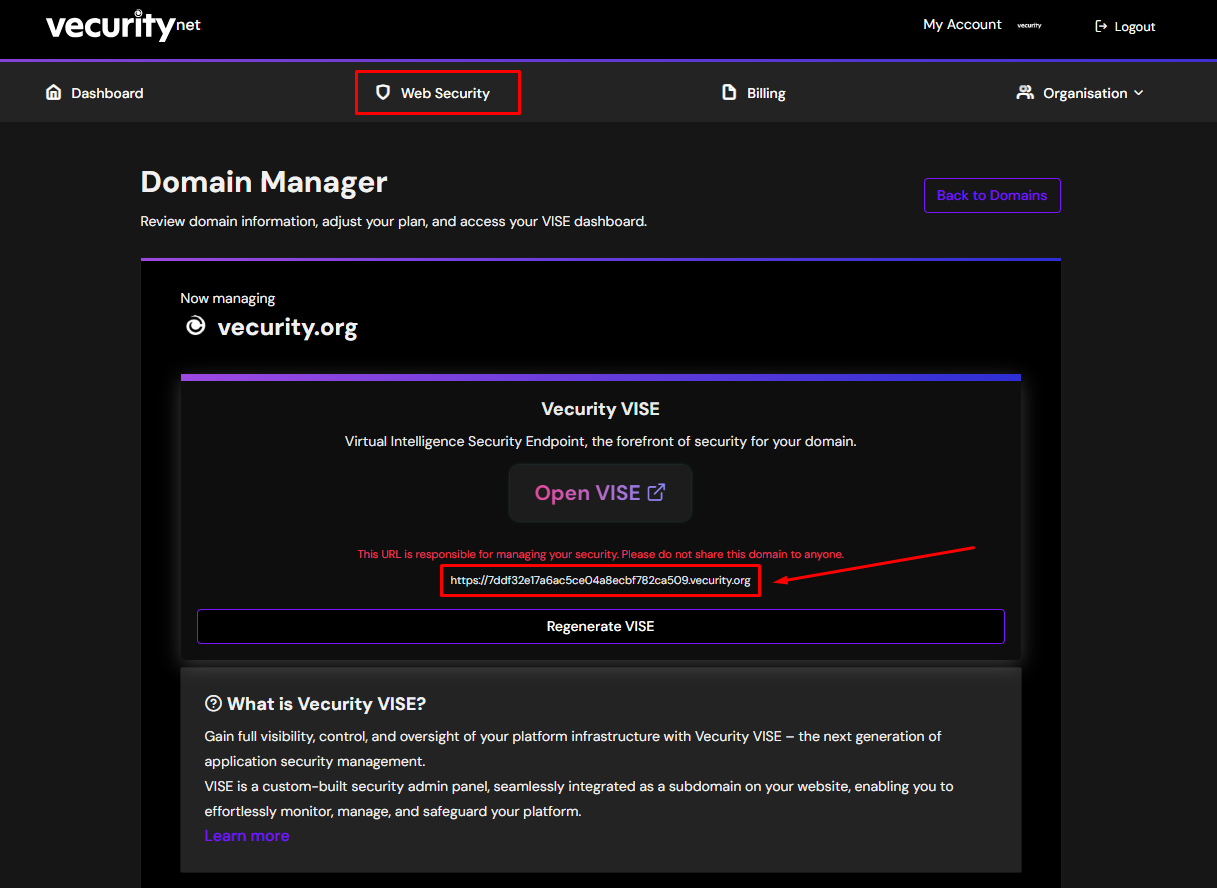 The URL you see here, also contains an API wrapper within the VISE application, meaning that it can be utilised programmatically also.
In terms of the VISE capability, please see below for the full specifics of what VISE is able to do for you.
## VISE Capability
Below is a summary of what VISE can be used for
```bash
Overall Sites Management
DNS Management
Security Features (DDOS Mitigation, WAF, IP Blocks, Region Blocks, etc)
Redirects
Page Rules (custom rules)
Traffic & Intelligence
Analytics
```
Each of the capabilities contain various `GET` `POST` and `DELETE` API methods that allow you to manage your domain.
Full capability of Vecurity VISE depends on your access to various plans, therefore some endpoint may be unavailable to users who are not within a [Plan](https://www.vecurity.net/pricing) the feature falls into.
Upgrading your plan allows you to gain access to more sophisticated features and tools in Vecurity VISE.
## Troubleshooting
There are several reasons why this may happen.
1. You do not have a DNS entry for your VISE record on your DNS provider.
2. Your domain on Vecurity has expired.
3. Your domain is not pointing to Vecurity nameservers, if you have opted to use our Nameservers.
4. An SSL certificate may be holding you back from using HTTPS. If this is the case, get in touch with our team and we can resolve it.
Solution: Feel free to get in touch with our support team at any time and we will be able to help out.
Curious about VISE? [Check out our page about Vecurity VISE](https://www.vecurity.net/vise).
# [POST] Purge Cache
Source: https://docs.vecurity.net/api-reference/endpoint/vecurity-vise/purge-cache
Purge Cache
**Prerequisite:**
Please ensure you have read the VISE Overview before proceeding as the API endpoint is based on your VISE url which is dynamic.
Where vise-url is mentioned, we are referring to your actual VISE domain, not 'vise-url'. Explained in the VISE overview.
All requests to the Vecurity VISE API requires Session creation in tandem with your Vecurity API token in order to make use of the API Endpoints. More details can be found the [VISE Authentication](/api-reference/endpoint/vecurity-vise/vise-authentication) page.
If you require support here, please get in touch with our Live chat or [support@vecurity.net](mailto:support@vecurity.net)
#### HTTP Endpoint `POST`
```
https://{VISE-URL}/api/purge_cache
```
#### Headers
```
Authorization: Bearer {your_api_token}
```
#### Request Body Parameters
```json
{
"domain_id": "string (required) - Customer provides domain id in MD5 UUID Form"
}
```
#### Endpoint Description
Purges the cache for a specific domain, forcing fresh content to be served on the next request.
#### Response Example
```json 200
{
"status": 200,
"message": "Cache purged successfully",
"data": {}
}
```
```json 400
{
"status": 400,
"message": "Invalid request parameters"
}
```
```json 401
{
"status": 401,
"message": "Authentication required"
}
```
# [POST] Update Cache Mode
Source: https://docs.vecurity.net/api-reference/endpoint/vecurity-vise/update-cache
The purpose of this endpoint is to update the caching mode for a record.
**Prerequisite:**
Please ensure you have read the VISE Overview before proceeding as the API endpoint is based on your VISE url which is dynamic.
Where vise-url is mentioned, we are referring to your actual VISE domain, not 'vise-url'. Explained in the VISE overview.
All requests to the Vecurity VISE API requires Session creation in tandem with your Vecurity API token in order to make use of the API Endpoints. More details can be found the [VISE Authentication](/api-reference/endpoint/vecurity-vise/vise-authentication) page.
If you require support here, please get in touch with our Live chat or [support@vecurity.net](mailto:support@vecurity.net)
#### HTTP Endpoint `POST`
```
https://{VISE-URL}/api/update_cache_mode
```
#### Headers
```
Authorization: Bearer {your_api_token}
```
#### Query Parameters
```
Authorization: Bearer {your_api_token}
- domain_id - String (required) - A unique GUID identifier for a domain.
- record_id - String (required) - A unique GUID identifier for a record.
- cache_mode - String (required) - The type of configuration to set a record caching mode to.
```
#### Endpoint Description
The purpose of this endpoint is to update the caching mode for a record.
#### Response Example
```json 200
{
"message": "Successfully updated record",
"status_code": 200,
"timestamp": "YYYY-MM-DDTHH:MM:SS UTC"
}
```
# [POST] Update Cache Mode
Source: https://docs.vecurity.net/api-reference/endpoint/vecurity-vise/update-cache-mode
Update cache mode
**Prerequisite:**
Please ensure you have read the VISE Overview before proceeding as the API endpoint is based on your VISE url which is dynamic.
Where vise-url is mentioned, we are referring to your actual VISE domain, not 'vise-url'. Explained in the VISE overview.
All requests to the Vecurity VISE API requires Session creation in tandem with your Vecurity API token in order to make use of the API Endpoints. More details can be found the [VISE Authentication](/api-reference/endpoint/vecurity-vise/vise-authentication) page.
If you require support here, please get in touch with our Live chat or [support@vecurity.net](mailto:support@vecurity.net)
#### HTTP Endpoint `POST`
```
https://{VISE-URL}/api/update_cache_mode
```
#### Request Body Parameters
```json
{
"domain_id": "string (required) - Domain ID in MD5 UUID form",
"record_id": "string (required) - Record ID",
"cache_mode": "string (required) - One of [ASSETS, EVERYTHING, NOTHING]"
}
```
#### Endpoint Description
Updates the cache mode for a specific record. Available modes:
* ASSETS: Cache only static assets
* EVERYTHING: Cache all content
* NOTHING: Disable caching
#### Response Example
```json 200
{
"status": 200,
"message": "Cache mode updated successfully",
"data": {}
}
```
```json 400
{
"status": 400,
"message": "Invalid request parameters"
}
```
```json 401
{
"status": 401,
"message": "Authentication required"
}
```
# [POST] Update Domain Mode
Source: https://docs.vecurity.net/api-reference/endpoint/vecurity-vise/update-domain-mode
The purpose of this endpoint is to set the mode of a domain by bulk updating all records modes.
**Prerequisite:**
Please ensure you have read the VISE Overview before proceeding as the API endpoint is based on your VISE url which is dynamic.
Where vise-url is mentioned, we are referring to your actual VISE domain, not 'vise-url'. Explained in the VISE overview.
All requests to the Vecurity VISE API requires Session creation in tandem with your Vecurity API token in order to make use of the API Endpoints. More details can be found the [VISE Authentication](/api-reference/endpoint/vecurity-vise/vise-authentication) page.
If you require support here, please get in touch with our Live chat or [support@vecurity.net](mailto:support@vecurity.net)
#### HTTP Endpoint `POST`
```
https://{VISE-URL}/api/domain_modes
```
#### Headers
```
Authorization: Bearer {your_api_token}
```
#### Query Parameters
```
Authorization: Bearer {your_api_token}
- domain_id - String (required) - A unique GUID identifier for a domain.
- domain_mode_id - String (string) - A unique GUID identifier for a domain mode (Provided by domain modes endpoint).
```
#### Endpoint Description
The purpose of this endpoint is to bulk update record modes within a specific domain.
#### Response Example
```json 200
{
"message": "Successfully updated record",
"status_code": 200,
"timestamp": "YYYY-MM-DDTHH:MM:SS UTC"
}
```
# [POST] Update Mitigation Mode
Source: https://docs.vecurity.net/api-reference/endpoint/vecurity-vise/update-mitigation-mode
The purpose of this endpoint is to update the ddos mitigation mode for a record.
**Prerequisite:**
Please ensure you have read the VISE Overview before proceeding as the API endpoint is based on your VISE url which is dynamic.
Where vise-url is mentioned, we are referring to your actual VISE domain, not 'vise-url'. Explained in the VISE overview.
All requests to the Vecurity VISE API requires Session creation in tandem with your Vecurity API token in order to make use of the API Endpoints. More details can be found the [VISE Authentication](/api-reference/endpoint/vecurity-vise/vise-authentication) page.
If you require support here, please get in touch with our Live chat or [support@vecurity.net](mailto:support@vecurity.net)
#### HTTP Endpoint `POST`
```
https://{VISE-URL}/api/update_mitigation_mode
```
#### Headers
```
Authorization: Bearer {your_api_token}
```
#### Query Parameters
```
Authorization: Bearer {your_api_token}
- domain_id - String (required) - A unique GUID identifier for a domain.
- record_id - String (required) - A unique GUID identifier for a record.
- mitigation_mode - String (required) - The type of configuration to set a record mitigation mode to.
```
#### Endpoint Description
The purpose of this endpoint is to update the ddos mitigation mode for a record.
#### Response Example
```json 200
{
"message": "Successfully updated record",
"status_code": 200,
"timestamp": "YYYY-MM-DDTHH:MM:SS UTC"
}
```
# [POST] Update Mitigation Threshold
Source: https://docs.vecurity.net/api-reference/endpoint/vecurity-vise/update-mitigation-threshold
The purpose of this endpoint is to update the ddos mitigation threshold mode for a record.
**Prerequisite:**
Please ensure you have read the VISE Overview before proceeding as the API endpoint is based on your VISE url which is dynamic.
Where vise-url is mentioned, we are referring to your actual VISE domain, not 'vise-url'. Explained in the VISE overview.
All requests to the Vecurity VISE API requires Session creation in tandem with your Vecurity API token in order to make use of the API Endpoints. More details can be found the [VISE Authentication](/api-reference/endpoint/vecurity-vise/vise-authentication) page.
If you require support here, please get in touch with our Live chat or [support@vecurity.net](mailto:support@vecurity.net)
#### HTTP Endpoint `POST`
```
https://{VISE-URL}/api/update_threshold
```
#### Headers
```
Authorization: Bearer {your_api_token}
```
#### Query Parameters
```
Authorization: Bearer {your_api_token}
- domain_id - String (required) - A unique GUID identifier for a domain.
- record_id - String (required) - A unique GUID identifier for a record.
- threshold_type - String (required) - The type of configuration to manage.
- threshold_value Int32 (required) - An integer value to update the specified threshold type to.
```
#### Endpoint Description
The purpose of this endpoint is to update the ddos mitigation threshold mode for a record.
#### Response Example
```json 200
{
"message": "Successfully updated record",
"status_code": 200,
"timestamp": "YYYY-MM-DDTHH:MM:SS UTC"
}
```
# [POST] Update Proxy Mode
Source: https://docs.vecurity.net/api-reference/endpoint/vecurity-vise/update-proxy-mode
The purpose of this endpoint is to update the proxying mode for a record.
**Prerequisite:**
Please ensure you have read the VISE Overview before proceeding as the API endpoint is based on your VISE url which is dynamic.
Where vise-url is mentioned, we are referring to your actual VISE domain, not 'vise-url'. Explained in the VISE overview.
All requests to the Vecurity VISE API requires Session creation in tandem with your Vecurity API token in order to make use of the API Endpoints. More details can be found the [VISE Authentication](/api-reference/endpoint/vecurity-vise/vise-authentication) page.
If you require support here, please get in touch with our Live chat or [support@vecurity.net](mailto:support@vecurity.net)
#### HTTP Endpoint `POST`
```
https://{VISE-URL}/api/update_proxy_mode
```
#### Headers
```
Authorization: Bearer {your_api_token}
```
#### Query Parameters
```
Authorization: Bearer {your_api_token}
- domain_id - String (required) - A unique GUID identifier for a domain.
- record_id - String (required) - A unique GUID identifier for a record.
- proxy_mode - String (required) - Indicator to enable or disable the supplied setting.
```
#### Endpoint Description
The purpose of this endpoint is to update the proxying mode for a record.
#### Response Example
```json 200
{
"message": "Successfully updated record",
"status_code": 200,
"timestamp": "YYYY-MM-DDTHH:MM:SS UTC"
}
```
# [POST] Update Record
Source: https://docs.vecurity.net/api-reference/endpoint/vecurity-vise/update-record
The purpose of this endpoint is to update the value of a DNS record.
**Prerequisite:**
Please ensure you have read the VISE Overview before proceeding as the API endpoint is based on your VISE url which is dynamic.
Where vise-url is mentioned, we are referring to your actual VISE domain, not 'vise-url'. Explained in the VISE overview.
All requests to the Vecurity VISE API requires Session creation in tandem with your Vecurity API token in order to make use of the API Endpoints. More details can be found the [VISE Authentication](/api-reference/endpoint/vecurity-vise/vise-authentication) page.
If you require support here, please get in touch with our Live chat or [support@vecurity.net](mailto:support@vecurity.net)
#### HTTP Endpoint `POST`
```
https://{VISE-URL}/api/update_record
```
#### Headers
```
Authorization: Bearer {your_api_token}
```
#### Query Parameters
```
Authorization: Bearer {your_api_token}
- domain_id - String (required) - A unique GUID identifier for a domain.
- record_id - String (required) - A unique GUID identifier for a domain.
- record_value - String (required) - The content of a DNS record (e.g., IP address or canonical domain).
```
#### Endpoint Description
The purpose of this endpoint is to update the value of a DNS record.
#### Response Example
```json 200
{
"message": "Successfully updated record",
"status_code": 200,
"timestamp": "YYYY-MM-DDTHH:MM:SS UTC"
}
```
# [POST] Update Threshold
Source: https://docs.vecurity.net/api-reference/endpoint/vecurity-vise/update-threshold
Update Threshold
**Prerequisite:**
Please ensure you have read the VISE Overview before proceeding as the API endpoint is based on your VISE url which is dynamic.
Where vise-url is mentioned, we are referring to your actual VISE domain, not 'vise-url'. Explained in the VISE overview.
All requests to the Vecurity VISE API requires Session creation in tandem with your Vecurity API token in order to make use of the API Endpoints. More details can be found the [VISE Authentication](/api-reference/endpoint/vecurity-vise/vise-authentication) page.
If you require support here, please get in touch with our Live chat or [support@vecurity.net](mailto:support@vecurity.net)
#### HTTP Endpoint `POST`
```
https://{VISE-URL}/api/update_threshold
```
#### Request Body Parameters
```json
{
"domain_id": "string (required) - MD5 UUID of the domain",
"record_id": "string (required) - ID of the DNS record",
"threshold_type": "string (required) - One of ['asset', 'server']",
"threshold_value": "integer (required) - Value between 20 and 1000"
}
```
#### Endpoint Description
Updates the threshold settings for a specific record. Threshold types:
* asset: Asset-based threshold
* server: Server-based threshold
The threshold value must be between 20 and 1000.
#### Response Example
```json 200
{
"status": 200,
"message": "Threshold updated successfully",
"data": {}
}
```
```json 400
{
"status": 400,
"message": "Invalid request parameters"
}
```
```json 401
{
"status": 401,
"message": "Authentication required"
}
```
# [POST] Update WAF Rules
Source: https://docs.vecurity.net/api-reference/endpoint/vecurity-vise/update-waf
The purpose of this endpoint is to update a Web Application Firewall setting for a record.
**Prerequisite:**
Please ensure you have read the VISE Overview before proceeding as the API endpoint is based on your VISE url which is dynamic.
Where vise-url is mentioned, we are referring to your actual VISE domain, not 'vise-url'. Explained in the VISE overview.
All requests to the Vecurity VISE API requires Session creation in tandem with your Vecurity API token in order to make use of the API Endpoints. More details can be found the [VISE Authentication](/api-reference/endpoint/vecurity-vise/vise-authentication) page.
If you require support here, please get in touch with our Live chat or [support@vecurity.net](mailto:support@vecurity.net)
#### HTTP Endpoint `POST`
```
https://{VISE-URL}/api/update_waf
```
#### Headers
```
Authorization: Bearer {your_api_token}
```
#### Query Parameters
```
Authorization: Bearer {your_api_token}
- domain_id - String (required) - A unique GUID identifier for a domain.
- record_id - String (required) - A unique GUID identifier for a record.
- waf_type - String (required) - The type of configuration to manage.
- waf_mode - String (required) - Indicator to enable or disable the supplied setting.
```
#### Endpoint Description
The purpose of this endpoint is to update a Web Application Firewall setting for a record.
#### Response Example
```json 200
{
"message": "Successfully updated record",
"status_code": 200,
"timestamp": "YYYY-MM-DDTHH:MM:SS UTC"
}
```
# VISE Authentication
Source: https://docs.vecurity.net/api-reference/endpoint/vecurity-vise/vise-authentication
This document includes details on how to authenticate your requests with our VISE API
**Prerequisite:**
Please ensure you have read the [VISE Overview](/api-reference/endpoint/vecurity-vise/overview) before proceeding as the API endpoint is based on your VISE url which is dynamic.
Where vise-url is mentioned, we are referring to your actual VISE domain, not 'vise-url'. Explained in the VISE overview.
#### Disclaimer
The Vecurity VISE API endpoint requires multi level authentication in order to gain access to using the endpoints required.
#### Authentication Flow
Please see a step by step breakdown on how to gain access to your VISE API endpoint.
1. Login to Vecurity Dashboard
2. Visit the 'My Account' section and gather your API token from the dashboard.
3. Make use of the [Vecurity Domains API](/api-reference/endpoint/vecurity/get-domains) to gather your domains, authenticated with the API token from the previous step.
1. Using the Domains endpoint, you will need to gather the following details in order to construct your Vecurity VISE authentication URL for creating the session to your domain.
1. `domain_vise_url` - The URL of your VISE endpoint
2. `domain_vise_phrase` - The key phrase to create a session on VISE.
2. Please note that there is an expiry on the session
3. You need to construct your endpoint like so: `https://{domain_vise_url}/auth?pfk={domain_vise_phrase}`
4. Now that you have your VISE URL, you will need to invoke a request to that endpoint, either utilising the response cookies and taking the `session` cookie in your next requests, or you can make use of creating a requests session.
5. Once you have your VISE URL, authenticated by your Session, you also need to make use of your API token as a Bearer token in the Authorization header for all subsequent VISE API requests
#### Code Example
Here is an example of how it looks in Python Requests.
```python Python
import requests
# Retrieved from the Vecurity Dashboard (we recommend using environment variables here)
# below is for demonstration and simplicity purposes only.
VECURITY_API_TOKEN = ""
headers = {
"Authorization": VECURITY_API_TOKEN
}
# Fetch list of domains from the Vecurity API
domains_response = requests.get("https://api.vecurity.net/v1/domain", headers=headers)
domains_response.raise_for_status() # Will raise an exception for HTTP errors
# Parse the domains data from the response
domains = domains_response.json()
# Iterate over the domains data
for domain in domains['data']:
data = domains['data'][domain]
# Check if the site is active on Vecurity
if data['domain_status_details']['enable_site']:
# Construct VISE URL
domain_vise_url = data['domain_vise_url']
domain_vise_phrase = data['domain_vise_phrase']
vise_url = f'https://{domain_vise_url}/auth?pfk={domain_vise_phrase}'
# Use a session for subsequent requests
with requests.Session() as vise_session:
try:
response = vise_session.get(vise_url)
# Check if session was created
if response.status_code == 200:
print("Authenticated!")
# Example usage of the Vecurity VISE API
vise_headers = {
"Authorization": f"Bearer {VECURITY_API_TOKEN}"
}
domains = vise_session.get(f'https://{domain_vise_url}/api/domains', headers=vise_headers)
if domains.status_code == 200:
print(domains.json())
else:
print("An issue occured with authentication, please debug.")
except requests.exceptions.RequestException as e:
print(f"An error occurred: {e}")
vise_session.close()
```
Specifically what this code is doing is constructing the VISE URL for all domains on your account, creating a session, then sending a request to each endpoint on the VISE API (VISE Domains Endpoint), returning the output of the VISE Domains endpoint for all of your domains.
Once the session is opened, you can perform programmatic requests using the VISE API.
#### Support
If you need any support with this, feel free to get in touch with our live chat or [support@vecurity.net](mailto:support@vecurity.net)
# Add Domain
Source: https://docs.vecurity.net/api-reference/endpoint/vecurity/add-domain
POST /domain
# Add Partner Domain
Source: https://docs.vecurity.net/api-reference/endpoint/vecurity/add-partner-domain
POST /partner/domain
# Add Partner Theme
Source: https://docs.vecurity.net/api-reference/endpoint/vecurity/add-partner-theme
POST /partner/theme
# Add User Billing Detail
Source: https://docs.vecurity.net/api-reference/endpoint/vecurity/add-user-billing-detail
POST /user/billing
# Add User Team
Source: https://docs.vecurity.net/api-reference/endpoint/vecurity/add-user-team
POST /user/team
# Add User Team Member
Source: https://docs.vecurity.net/api-reference/endpoint/vecurity/add-user-team-member
POST /user/team/{teamId}/member
# Add User Team Member Resource
Source: https://docs.vecurity.net/api-reference/endpoint/vecurity/add-user-team-member-resource
POST /user/team/{teamId}/member/{memberId}/resource
# Remove Domain
Source: https://docs.vecurity.net/api-reference/endpoint/vecurity/delete-domain
DELETE /domain/{domainId}
# Remove Domain Billing Detail
Source: https://docs.vecurity.net/api-reference/endpoint/vecurity/delete-domain-billing
DELETE /domain/{domainId}/billing
# Remove Partner Domain
Source: https://docs.vecurity.net/api-reference/endpoint/vecurity/delete-partner-domain
DELETE /partner/domain/{domainId}
# Remove Partner Theme
Source: https://docs.vecurity.net/api-reference/endpoint/vecurity/delete-partner-theme
DELETE /partner/theme/{themeId}
# Remove User Billing Detail
Source: https://docs.vecurity.net/api-reference/endpoint/vecurity/delete-user-billing-detail
DELETE /user/billing/{billingDetailId}
# Remove User Payment Method
Source: https://docs.vecurity.net/api-reference/endpoint/vecurity/delete-user-payment-method
DELETE /user/payment_method/{paymentMethodId}
# Remove User Team
Source: https://docs.vecurity.net/api-reference/endpoint/vecurity/delete-user-team
DELETE /user/team/{teamId}
# Remove User Team Member
Source: https://docs.vecurity.net/api-reference/endpoint/vecurity/delete-user-team-member
DELETE /user/team/{teamId}/member/{memberId}
# Remove User Team Member Resource
Source: https://docs.vecurity.net/api-reference/endpoint/vecurity/delete-user-team-member-resource
DELETE /user/team/{teamId}/member/{memberId}/resource/{resourceId}
# Regenerate User Token
Source: https://docs.vecurity.net/api-reference/endpoint/vecurity/delete-user-token
DELETE /token
# Get Announcements
Source: https://docs.vecurity.net/api-reference/endpoint/vecurity/get-announcements
GET /announcements
# Get Countries
Source: https://docs.vecurity.net/api-reference/endpoint/vecurity/get-countries
GET /country
# Get Country
Source: https://docs.vecurity.net/api-reference/endpoint/vecurity/get-country
GET /country/{countryId}
# Get Domain
Source: https://docs.vecurity.net/api-reference/endpoint/vecurity/get-domain
GET /domain/{domainId}
# Get Domain Billing Detail
Source: https://docs.vecurity.net/api-reference/endpoint/vecurity/get-domain-billing
GET /domain/{domainId}/billing
# Get Domain Plan
Source: https://docs.vecurity.net/api-reference/endpoint/vecurity/get-domain-plan
GET /domain/{domainId}/plan
# Get Domain Firewall Statistics
Source: https://docs.vecurity.net/api-reference/endpoint/vecurity/get-domain-stat-firewall
GET /domain/{domainId}/stats/firewall
# Get Domain Incidents Statistics
Source: https://docs.vecurity.net/api-reference/endpoint/vecurity/get-domain-stat-incidents
GET /domain/{domainId}/stats/incidents
# Get Domain Traffic Statistics
Source: https://docs.vecurity.net/api-reference/endpoint/vecurity/get-domain-stat-traffic
GET /domain/{domainId}/stats/traffic
# Get Domain Uptime Statistics
Source: https://docs.vecurity.net/api-reference/endpoint/vecurity/get-domain-stat-uptime
GET /domain/{domainId}/stats/uptime
# Get Domain VISE
Source: https://docs.vecurity.net/api-reference/endpoint/vecurity/get-domain-vise
GET /domain/{domainId}/vise
# Get Domains
Source: https://docs.vecurity.net/api-reference/endpoint/vecurity/get-domains
GET /domain
# Get Partner
Source: https://docs.vecurity.net/api-reference/endpoint/vecurity/get-partner
GET /partner
# Get Partner Domain
Source: https://docs.vecurity.net/api-reference/endpoint/vecurity/get-partner-domain
GET /partner/domain/{domainId}
# Get Partner Domain Expiry
Source: https://docs.vecurity.net/api-reference/endpoint/vecurity/get-partner-domain-expiry
GET /partner/domain/{domainId}/expiry
# Get Partner Domain VISE
Source: https://docs.vecurity.net/api-reference/endpoint/vecurity/get-partner-domain-vise
GET /partner/domain/{domainId}/vise
# Get Partner Domains
Source: https://docs.vecurity.net/api-reference/endpoint/vecurity/get-partner-domains
GET /partner/domain
# Get Partner Theme
Source: https://docs.vecurity.net/api-reference/endpoint/vecurity/get-partner-theme
GET /partner/theme/{themeId}
# Get Partner Themes
Source: https://docs.vecurity.net/api-reference/endpoint/vecurity/get-partner-themes
GET /partner/theme
# Get Domain Plans
Source: https://docs.vecurity.net/api-reference/endpoint/vecurity/get-plan-domain
GET /plan/domain
# Get User Detail
Source: https://docs.vecurity.net/api-reference/endpoint/vecurity/get-user
GET /user
# Get User Billing Detail
Source: https://docs.vecurity.net/api-reference/endpoint/vecurity/get-user-billing-detail
GET /user/billing/{billingDetailId}
# Get User Billing Details
Source: https://docs.vecurity.net/api-reference/endpoint/vecurity/get-user-billing-details
GET /user/billing
# Get User Invoice
Source: https://docs.vecurity.net/api-reference/endpoint/vecurity/get-user-invoice
GET /user/invoice/{invoiceId}
# Get User Invoice Item
Source: https://docs.vecurity.net/api-reference/endpoint/vecurity/get-user-invoice-item
GET /user/invoice/{invoiceId}/item/{invoiceItemId}
# Get User Invoice Items
Source: https://docs.vecurity.net/api-reference/endpoint/vecurity/get-user-invoice-items
GET /user/invoice/{invoiceId}/item
# Get User Invoices
Source: https://docs.vecurity.net/api-reference/endpoint/vecurity/get-user-invoices
GET /user/invoice
# Get User Payment Method
Source: https://docs.vecurity.net/api-reference/endpoint/vecurity/get-user-payment-method
GET /user/payment_method/{paymentMethodId}
# Get User Payment Methods
Source: https://docs.vecurity.net/api-reference/endpoint/vecurity/get-user-payment-methods
GET /user/payment_method
# Get User Profile
Source: https://docs.vecurity.net/api-reference/endpoint/vecurity/get-user-profile
GET /user/profile
# Get User Resources
Source: https://docs.vecurity.net/api-reference/endpoint/vecurity/get-user-resources
GET /user/resources
# Get User Team
Source: https://docs.vecurity.net/api-reference/endpoint/vecurity/get-user-team
GET /user/team/{teamId}
# Get User Team Member
Source: https://docs.vecurity.net/api-reference/endpoint/vecurity/get-user-team-member
GET /user/team/{teamId}/member/{memberId}
# Get User Team Member Resource
Source: https://docs.vecurity.net/api-reference/endpoint/vecurity/get-user-team-member-resource
GET /user/team/{teamId}/member/{memberId}/resource/{resourceId}
# Get User Team Member Resources
Source: https://docs.vecurity.net/api-reference/endpoint/vecurity/get-user-team-member-resources
GET /user/team/{teamId}/member/{memberId}/resource
# Get User Team Members
Source: https://docs.vecurity.net/api-reference/endpoint/vecurity/get-user-team-members
GET /user/team/{teamId}/member
# Get User Teams
Source: https://docs.vecurity.net/api-reference/endpoint/vecurity/get-user-teams
GET /user/team
# Get User Token
Source: https://docs.vecurity.net/api-reference/endpoint/vecurity/get-user-token
GET /token
# Scan Domain DNS
Source: https://docs.vecurity.net/api-reference/endpoint/vecurity/scan-domain-dns
POST /domain/{domainId}/scan
# Scan Partner Domain DNS
Source: https://docs.vecurity.net/api-reference/endpoint/vecurity/scan-partner-domain-dns
POST /partner/domain/{domainId}/scan
# Update Domain Billing Detail
Source: https://docs.vecurity.net/api-reference/endpoint/vecurity/update-domain-billing
POST /domain/{domainId}/billing
# Update Domain Plan
Source: https://docs.vecurity.net/api-reference/endpoint/vecurity/update-domain-plan
POST /domain/{domainId}/plan
# Regenerate Domain VISE
Source: https://docs.vecurity.net/api-reference/endpoint/vecurity/update-domain-vise
POST /domain/{domainId}/vise
# Update Partner Domain Expiry
Source: https://docs.vecurity.net/api-reference/endpoint/vecurity/update-partner-domain-expiry
POST /partner/domain/{domainId}/expiry
# Update Partner Domain Plan
Source: https://docs.vecurity.net/api-reference/endpoint/vecurity/update-partner-domain-plan
POST /partner/domain/{domainId}/plan
# Update Partner Domain Status
Source: https://docs.vecurity.net/api-reference/endpoint/vecurity/update-partner-domain-status
POST /partner/domain/{domainId}/status
# Update Partner Domain Theme
Source: https://docs.vecurity.net/api-reference/endpoint/vecurity/update-partner-domain-theme
POST /partner/domain/{domainId}/theme
# Update Partner Domain VISE
Source: https://docs.vecurity.net/api-reference/endpoint/vecurity/update-partner-domain-vise
POST /partner/domain/{domainId}/vise
# Update Partner Theme
Source: https://docs.vecurity.net/api-reference/endpoint/vecurity/update-partner-theme
POST /partner/theme/{themeId}
# Update User Site Theme
Source: https://docs.vecurity.net/api-reference/endpoint/vecurity/update-user-site-theme
POST /user/theme
# Verify Domain Nameservers
Source: https://docs.vecurity.net/api-reference/endpoint/vecurity/verify-domain-dns
POST /domain/{domainId}/verify
# Verify Partner Domain Nameservers
Source: https://docs.vecurity.net/api-reference/endpoint/vecurity/verify-partner-domain-dns
POST /partner/domain/{domainId}/verify
# Introduction
Source: https://docs.vecurity.net/api-reference/introduction
This API documentation is under heavy development and is not stable
**\~ 19th December 2024.**
# Development
Source: https://docs.vecurity.net/development
Preview changes locally to update your docs
**Prerequisite**: Please install Node.js (version 19 or higher) before proceeding.
Follow these steps to install and run Mintlify on your operating system:
**Step 1**: Install Mintlify:
```bash npm
npm i -g mintlify
```
```bash yarn
yarn global add mintlify
```
**Step 2**: Navigate to the docs directory (where the `mint.json` file is located) and execute the following command:
```bash
mintlify dev
```
A local preview of your documentation will be available at `http://localhost:3000`.
### Custom Ports
By default, Mintlify uses port 3000. You can customize the port Mintlify runs on by using the `--port` flag. To run Mintlify on port 3333, for instance, use this command:
```bash
mintlify dev --port 3333
```
If you attempt to run Mintlify on a port that's already in use, it will use the next available port:
```md
Port 3000 is already in use. Trying 3001 instead.
```
## Mintlify Versions
Please note that each CLI release is associated with a specific version of Mintlify. If your local website doesn't align with the production version, please update the CLI:
```bash npm
npm i -g mintlify@latest
```
```bash yarn
yarn global upgrade mintlify
```
## Validating Links
The CLI can assist with validating reference links made in your documentation. To identify any broken links, use the following command:
```bash
mintlify broken-links
```
## Deployment
Unlimited editors available under the [Pro
Plan](https://mintlify.com/pricing) and above.
If the deployment is successful, you should see the following:
 ## Code Formatting
We suggest using extensions on your IDE to recognize and format MDX. If you're a VSCode user, consider the [MDX VSCode extension](https://marketplace.visualstudio.com/items?itemName=unifiedjs.vscode-mdx) for syntax highlighting, and [Prettier](https://marketplace.visualstudio.com/items?itemName=esbenp.prettier-vscode) for code formatting.
## Troubleshooting
This may be due to an outdated version of node. Try the following:
1. Remove the currently-installed version of mintlify: `npm remove -g mintlify`
2. Upgrade to Node v19 or higher.
3. Reinstall mintlify: `npm install -g mintlify`
Solution: Go to the root of your device and delete the \~/.mintlify folder. Afterwards, run `mintlify dev` again.
Curious about what changed in the CLI version? [Check out the CLI changelog.](https://www.npmjs.com/package/mintlify?activeTab=versions)
# Product Overview
Source: https://docs.vecurity.net/products/overview
A full list of products by Vecurity.
# Vecurity API
Source: https://docs.vecurity.net/vecurity
## Setup your development
Learn how to update your docs locally and deploy them to the public.
### Edit and preview
During the onboarding process, we created a repository on your Github with
your docs content. You can find this repository on our
[dashboard](https://dashboard.mintlify.com). To clone the repository
locally, follow these
[instructions](https://docs.github.com/en/repositories/creating-and-managing-repositories/cloning-a-repository)
in your terminal.
Previewing helps you make sure your changes look as intended. We built a
command line interface to render these changes locally. 1. Install the
[Mintlify CLI](https://www.npmjs.com/package/mintlify) to preview the
documentation changes locally with this command: `npm i -g mintlify`
2\. Run the following command at the root of your documentation (where
`mint.json` is): `mintlify dev`
### Deploy your changes
Our Github app automatically deploys your changes to your docs site, so you
don't need to manage deployments yourself. You can find the link to install on
your [dashboard](https://dashboard.mintlify.com). Once the bot has been
successfully installed, there should be a check mark next to the commit hash
of the repo.
[Commit and push your changes to
Git](https://docs.github.com/en/get-started/using-git/pushing-commits-to-a-remote-repository#about-git-push)
for your changes to update in your docs site. If you push and don't see that
the Github app successfully deployed your changes, you can also manually
update your docs through our [dashboard](https://dashboard.mintlify.com).
## Update your docs
Add content directly in your files with MDX syntax and React components. You can use any of our components, or even build your own.
Add flair to your docs with personalized branding.
Implement your OpenAPI spec and enable API user interaction.
Draw insights from user interactions with your documentation.
Keep your docs on your own website's subdomain.